Most charity finance leads I speak to know Microsoft offers “something” for nonprofits. Fewer know the full picture stretches across Google, Canva, Salesforce, Xero and now a growing list of AI tools, and that missing even one of these can mean paying full commercial price for no reason at all.

Charity software discounts are grants and reduced-price licences that technology vendors offer to registered UK charities and nonprofits, usually verified through the vendor directly or through a nonprofit verification partner. For a typical 25-person charity, stacking these correctly can be the difference between a five-figure annual software bill and a genuinely modest one.

What To Learn About Charity Software Deals:

  • Which vendors offer free or discounted software to UK charities, and by how much
  • Why one verification step unlocks most of these deals at once
  • Why Xero and QuickBooks aren’t on equal footing for UK charities
  • Which AI tools now have nonprofit pricing, and what that means for donor data

The verification step that unlocks everything

Nearly every deal in this article runs through the same front door. UK charities verify their nonprofit status through TechSoup UK, which works closely with the long-running charity technology organisation Charity Digital. Since July 2025, the technology discount catalogue has been managed directly by TechSoup UK, while Charity Digital continues to run its other charity-support programmes. Once verified, that status unlocks Microsoft, Google, Canva and several other programmes without reapplying from scratch each time.

I often see charities that set up Microsoft 365 years ago on commercial pricing and never came back to verify their nonprofit status. It’s a surprisingly common gap, and usually costs several times more than it needs to. If your charity has never been through nonprofit verification, that’s the single highest-value hour you can spend this quarter.

Microsoft: the biggest discounts, with caps to watch

Microsoft’s own nonprofit programme offers Microsoft 365 Business Premium at a 75% discount for eligible nonprofits, Dynamics 365 Business Central at 60% off, and Copilot at a further 15% discount on top of a base licence. In practice, Business Premium runs at roughly ยฃ4.40 per user per month against a commercial list price of around ยฃ19.10. The catch most charities miss is the cap: the Business Premium grant is limited to 10 donated seats and 300 total discounted seats per organisation, so growing charities can accidentally tip into commercial-rate licences for headcount above that.

Charities using Azure for websites, databases or AI experimentation shouldn’t overlook the cloud credit either. Microsoft’s annual Azure Grant gives nonprofits $2,000 (USD) in Azure service credits each year, roughly ยฃ1,500, and usage below that threshold effectively costs nothing.

Google, Canva and Salesforce

Google Ad Grants give eligible charities up to $10,000 a month in free search advertising, alongside free access to Google Workspace, YouTube’s nonprofit programme, and Google Earth and Maps. Eligibility runs through Charity Commission, OSCR or HMRC tax-exempt status, and government bodies, hospitals and schools generally can’t apply.

Canva Nonprofits gives registered charities the full Canva Pro feature set plus team collaboration tools, completely free for teams of up to 50 users, which covers most SME-sized charities outright. For fundraising and donor management, Salesforce’s Power of Us programme gives eligible nonprofits ten free Nonprofit Cloud or Sales Cloud licences, with discounts available on any additional seats.

Zoom rounds out the everyday stack. Zoom Cares offers 50% off Zoom Workplace Pro, Business, Webinars and Large Meetings for nonprofits with operating budgets under $10 million, verified directly through Zoom rather than TechSoup following a change to that partnership in 2025.

Accounting software: Xero pulls ahead of QuickBooks

This is where the two big accounting platforms part ways for UK charities.

Xero offers a straightforward 25% discount on its standard subscription plans for registered not-for-profit organisations, applied once you’ve subscribed and Xero has confirmed your charity status. In practice that works out to roughly ยฃ24/month on Standard and ยฃ33/month on Premium as of 2026. You subscribe first, then submit your charity registration number within 31 days, and the discount lands on your next invoice.

QuickBooks is the one to be careful with. Intuit’s nonprofit discount runs through the US TechSoup, offering QuickBooks Online Plus and Advanced as donated annual subscriptions, priced in dollars and built around 501(c)(3)-style eligibility and a $10 million budget cap. It’s also limited to one donated subscription per organisation, ever, with annual re-verification required to keep the rate. The UK version of QuickBooks tailors the chart of accounts for charity use, but doesn’t carry an equivalent ongoing UK nonprofit discount, only the same general new-customer offers any business could claim. For most UK charities, that makes Xero the more dependable option on price alone.

Mailchimp and the AI tools catching up fast

Mailchimp’s nonprofit discount is a flatter 15% off standard paid plans, requested through their billing team after account setup.

AI is the newest, and fastest-moving, part of the stack. OpenAI now offers eligible nonprofits up to a 75% discount on ChatGPT Business or Enterprise, a meaningful shift from AI being a “nice to have” to a budgeted line item. Microsoft’s equivalent sits inside the 365 ecosystem: Copilot Chat comes included in a standard subscription at no extra cost, while the full Copilot add-on carries its own nonprofit discount on top of your base licence. Google isn’t standing still either, with Gemini bundled into Google Workspace for Nonprofits at no additional charge.

According to the Nxt Gen IT team’s work with SME and charity clients, the discount is rarely the part that trips people up. It’s data governance. Before rolling out any AI tool to staff, it’s worth deciding which categories of data, donor records, beneficiary details, safeguarding notes, are off-limits, discount or no discount, and getting that agreed before rollout rather than after.

Addendum: does Claude have a charity discount?

Great question from an eagle-eyed reader! Yes. Anthropic launched Claude for Nonprofits in December 2025, and it’s very much live rather than “on the horizon.”

It works the same way as the software deals above: you verify your organisation’s nonprofit status, and the discount applies automatically. Verification runs through Anthropic’s partner Goodstack, a two-to-three minute form, rather than TechSoup or Charity Digital. Eligibility covers organisations with 501(c)(3) status or an equivalent international charitable designation, which is how UK registered charities qualify, plus K-12 schools. Government bodies, political organisations, higher education and hospital systems aren’t eligible.

On price, the Team plan runs two seat types: Standard at $8 per user per month and Premium at $40 per user per month, both already discounted, against commercial list prices of roughly $25 and $125. Anthropic describes this as up to 75% off. Every seat includes Claude Code and Claude’s Cowork feature, and the Team plan supports up to 150 seats before you need to move to Enterprise, which is sales-priced. There are also purpose-built connectors for Blackbaud, Benevity and Candid, alongside the usual Microsoft 365, Google Workspace and Slack connectors, plus a free “AI Fluency for Nonprofits” course.

For a UK charity already weighing up ChatGPT’s own nonprofit discount, this puts Claude on genuinely comparable footing on price. The decision point is the same one we’d flag for any AI tool: work out which categories of data, donor records, beneficiary details, safeguarding notes, you’re comfortable putting into any AI assistant, discounted or not, before rollout rather than after.

FAQ

Do we need to be a registered charity to get these discounts?

Yes, in almost every case. Most vendors require Charity Commission, OSCR or NICC registration, or HMRC-recognised tax-exempt status. Community interest companies and informal groups typically don’t qualify unless they also hold charity status.

Can we apply for all of these at once?

TechSoup UK verification is the starting point for Microsoft, Google, Canva and several others, so one verification does most of the work. Salesforce, Zoom, Xero and the AI vendor programmes are applied for separately once you have that base verification in place.

Is Xero or QuickBooks better for a UK charity?

On price, Xero is the more dependable choice. Its 25% nonprofit discount applies directly and consistently in the UK. QuickBooks’ nonprofit pricing runs through a US-centric programme that most UK charities can’t access in the same way.

What’s the biggest mistake charities make with these deals?

Not revisiting pricing after initial setup. Charities that set up Microsoft 365 or another tool years ago on commercial pricing often stay there indefinitely simply because nobody checked whether nonprofit pricing had become available.

Nxt Steps

  • Verify through TechSoup UK first. It’s free, and it unlocks the Microsoft, Google and Canva discounts in one step.
  • Check your seat caps. Microsoft’s Business Premium grant is capped at 300 discounted seats, so growing charities should review this annually.
  • Decide your AI data rules before rollout, not after. The discount is the easy part.

Explore how Nxt Gen IT can support your nonprofit. Arrange a call with a one of our specialists.


Handy Links


Two clients came to us this week with almost identical requests. Both had a member of staff who had built a small internal tool using an AI assistant. Both were connecting it to the company’s Microsoft 365 account. Both just needed IT to “switch on access” so it could run properly.

In one case, the access being requested would give that tool the ability to read every email in the business. Not just the person who built it. Every inbox. Every member of staff. In the other, the tool would have been able to modify employee accounts across the entire organisation.

Neither client knew that was what they were approving.

Employee-built apps and Microsoft 365 security is fast becoming one of the most overlooked risks in UK SMEs. AI tools have made it straightforward for non-technical staff to build working software, often in an afternoon. That is genuinely useful. But when those tools connect to business systems, the level of access they request is not always what it sounds like, and it is rarely reviewed before it gets approved.

What you will learn in this post:

  • Why the tools your staff are building may be requesting far more access than they need
  • What “read emails” or “access user information” can actually mean at a business level
  • Two questions worth asking before any new tool gets connected to your systems
  • How to stay in control without blocking the initiative that makes these tools valuable in the first place

AI has made building software easy. Oversight has not kept up.

There is a growing number of people in UK businesses who are building their own tools with the help of AI assistants. They are not software developers. They are operations managers, recruiters, finance leads, and administrators who have discovered that AI can turn a business problem into a working piece of software in a matter of hours.

This is sometimes called vibe coding. The result is usually something genuinely useful. A tool that pulls data from one system and drops it into another. An automated report. A custom notification that saves someone an hour a week.

The problem is not the tool. The problem is what happens when that tool needs access to business systems.

To connect to Microsoft 365, any tool needs permission to do so. Those permissions have names. Fairly straightforward-sounding names. “Read emails.” “Access user information.” “View files.”

What those names do not tell you is the scale of what is being granted.


What “read emails” can actually mean

Depending on how a permission is set up, “read emails” can mean the tool has access to every single inbox in your organisation. Not the account of the person who built it. Every member of staff.

“Access user information” can mean the tool has the ability to reset passwords and change staff roles. “View files” can mean every document across every department, every SharePoint site, every folder in OneDrive.

These are not security flaws. These capabilities exist for legitimate reasons. Large organisations use them for compliance archiving, IT management, and security monitoring. But they were not designed with an afternoon project in mind.

According to the Nxt Gen IT team, this is one of the most consistent findings when we review what is connected to a client’s Microsoft 365 environment. Tools running with far broader access than the task they were built for would ever require.

The NCSC recommends that access to business systems should always follow the principle of least privilege: only the minimum level of access needed to do the job. Most employee-built tools do not come close to meeting that standard, not because the builder was careless, but because nobody told them it mattered.


Why nobody questions it

Staff building tools with AI assistance are not doing anything wrong. They are solving real problems. The AI helps them write the code, points them to the documentation, and suggests the permissions the tool needs. Those permissions are technically correct. They are just not always the minimum that would do the job.

Without knowing that a difference exists between “access on behalf of this user” and “access across the entire organisation,” there is no reason to push back. It works. It gets approved. And quietly, that tool now has a level of access that nobody explicitly chose to grant.

The risk rarely looks like a deliberate attack. It looks more like this: the tool was built on someone’s personal account, and when they leave the business, no one knows how to access or turn it off. Or the credentials the tool uses are stored somewhere insecure and get exposed in a breach. Or the tool runs unnoticed for two years, until something goes wrong and IT has to unpick what it was doing.


Two questions that cover most of the risk

You do not need technical knowledge to manage this well. Two questions, asked before any new tool gets connected to business systems, cover most of the risk.

Has IT seen the permission request?
Not after the tool is already running. Before. A short conversation at that point can prevent weeks of untangling later. IT can usually help the builder get the same result with a fraction of the access originally requested.

Is the tool registered under a business account or a personal one?
If it sits on a personal Microsoft account, it leaves with that person. There is also no central record of what access exists. Either of those is a problem worth avoiding.

Most of the time, the answer to both questions leads to the same outcome: the tool works exactly as intended, and the business stays in control of what it has connected to its systems.


Frequently asked questions

Should I be worried if staff are already building tools like this?

Not necessarily, but it is worth finding out what is connected and what access those connections hold. Many businesses have tools running quietly in the background that have never been formally reviewed. That is usually straightforward to sort out with the right IT support.

Do I need to stop staff from building their own tools?

No. The goal is visibility, not restriction. Staff initiative is genuinely valuable, and blocking it creates its own problems. A simple sign-off process, where any tool that connects to business systems gets a quick IT check first, is usually enough.

What does “access to Microsoft 365” actually mean for a third-party tool?

It depends entirely on the permissions granted. At one end, a tool might only be able to see one person’s calendar. At the other, it could read every email in the business or modify staff accounts. The permission name rarely makes the difference clear.

How do I find out what is already connected to our Microsoft 365 account?

Your IT team can pull a full list of every application registered against your Microsoft 365 environment, along with the permissions each one holds. If you are not sure where to start, that is a conversation Nxt Gen IT can help with.


Nxt Steps

Staff building their own tools is not a problem to eliminate. It is a capability worth managing properly.

Three things worth doing this week:

  • Ask IT to review what is currently connected to your Microsoft 365 environment and what access each connection holds
  • Make sure any new tool that connects to business systems goes through a quick IT check before it goes live
  • Confirm that existing tools are registered under business accounts, not personal ones

None of that requires technical knowledge to ask for. And it is far easier to get right from the start than to unpick after the fact.

Explore how Nxt Gen IT can support your business. Book a call with Vinnie Itani, our resident automation and AI expert.


Related reading: When Anyone Can Build Software: Business Governance Guide

Could your business withstand a cyber attack tomorrow?

Thatโ€™s the question many UK business owners are quietly asking themselves following the Governmentโ€™s new โ€œlock the doorโ€ cyber security campaign.

In simple terms, the message is this:

Cyber security is no longer optional hygiene. Itโ€™s a basic business responsibility.

According to recent Government figures, cyber threats cost UK businesses an estimatedย ยฃ14.7 billion per year, and aroundย half of small businesses experienced a breach or attack in the last 12 months. The average significant incident can costย around ยฃ195,000. This is enough to seriously damage, or even close, many SMEs.

At Nxt Gen IT, I often see businesses assume theyโ€™re โ€œtoo small to matterโ€. The reality is very different. Criminals donโ€™t target size. They target weakness.


Cyber Risk Is a Board-Level Issue

For years, cyber security has been treated as an IT department concern.

That mindset is outdated.

A breach today affects:

  • Revenue
  • Customer trust
  • Insurance premiums
  • Contract eligibility
  • Regulatory compliance
  • Director liability

This is business resilience, not technical housekeeping.

According to theย National Cyber Security Centreย (NCSC), most attacks exploit basic vulnerabilities. Weak passwords, unpatched systems, poor access controls. In other words, preventable gaps.

From what I see working with UK SMEs, the biggest risk isnโ€™t sophisticated hackers. Itโ€™s inconsistent basics.


The Governmentโ€™s โ€œLock the Doorโ€ Campaign

The campaign, led byย UK Governmentย and supported by the NCSC, encourages organisations to treat digital security like physical security.

You wouldnโ€™t leave your office unlocked overnight.

Yet many businesses:

  • Share admin accounts
  • Delay critical updates
  • Lack multi-factor authentication
  • Havenโ€™t tested their backups
  • Donโ€™t formally review access rights

The campaignโ€™s message is refreshingly straightforward: start with practical, proven protections.

And that leads directly to Cyber Essentials.


Cyber Essentials: The Practical Starting Point

The Government-backedย Cyber Essentialsย scheme sets out five core controls that significantly reduce common cyber risks.

These arenโ€™t complex projects. Theyโ€™re structured good practice:

  1. Firewallsย โ€“ Control inbound and outbound traffic
  2. Secure configurationย โ€“ Remove default passwords and unnecessary services
  3. Software updatesย โ€“ Patch known vulnerabilities promptly
  4. User access controlย โ€“ Limit access to whatโ€™s genuinely needed
  5. Malware protectionย โ€“ Use reputable endpoint security tools

According to government-backed research, organisations with Cyber Essentials certification experience significantly fewer insurance claims related to cyber incidents.

Thatโ€™s not coincidence. Itโ€™s proof that basics work.

At Nxt Gen IT, when we help businesses prepare for Cyber Essentials or Cyber Essentials Plus, weโ€™re not just chasing a badge. Weโ€™re building resilience into daily operations.


Why This Matters More in 2026

From my conversations with business owners, three shifts are happening:

1. Insurers Are Raising the Bar

Cyber insurance providers increasingly expect evidence of baseline controls. Without them, premiums rise or cover is declined.

2. Supply Chains Are Asking Questions

More contracts now require proof of certification or documented controls.

3. Criminals Target Opportunity

Attackers automate their scanning. If your defences are weak, youโ€™re visible. Itโ€™s that simple.

Being โ€œtoo smallโ€ is no longer protection. In many cases, itโ€™s the attraction.


Practical Steps You Can Take Today

If youโ€™re unsure where you stand, start here:

โœ” Map Your Data

  • Where is sensitive information stored?
  • Who can access it?
  • Is access reviewed regularly?

โœ” Turn on Multi-Factor Authentication

Especially for:

  • Microsoft 365
  • Remote access tools
  • Email accounts

โœ” Patch Promptly

Delayed updates remain one of the most common entry points for attackers.

โœ” Train Your Team

Most breaches still begin with phishing. Staff awareness is one of the highest ROI security measures available.

โœ” Review Backups

Are they:

  • Tested?
  • Isolated from your main network?
  • Recoverable within acceptable timeframes?

These are foundational steps. Not complicated. Just consistent.


Where a Proactive IT Partner Makes the Difference

Many SMEs donโ€™t have in-house cyber specialists. Thatโ€™s entirely normal.

What matters is having structured support.

As a Managed Service Provider UK businesses rely on, Nxt Gen IT helps organisations with:

  • Cyber Essentials readiness assessments
  • Gap analysis and remediation planning
  • Ongoing monitoring and proactive IT support
  • Strategic IT direction aligned with growth goals
  • Security policy development and staff awareness training

I often say: the campaign explains why cyber security matters. A trusted partner helps with the how.


Quick Definition: What Is Cyber Essentials?

Cyber Essentials is a UK Government-backed certification scheme that verifies an organisation has implemented five baseline cyber security controls designed to prevent the most common attacks.

It is widely recognised by insurers, public sector buyers and supply chains as evidence of responsible cyber hygiene.

For official guidance, refer to the National Cyber Security Centre website (external resource suggestion).


The Bigger Picture: IT Peace of Mind

The Governmentโ€™s campaign isnโ€™t about fear. Itโ€™s about raising standards.

Cyber security maturity is becoming a baseline expectation, just like health and safety compliance or financial reporting.

Businesses that act early gain:

  • Competitive credibility
  • Reduced insurance friction
  • Stronger client confidence
  • Fewer operational disruptions

Those that delay risk learning the hard way.

From what Iโ€™ve seen over the years, recovery is always more expensive than prevention.


Nxt Steps

If youโ€™re unsure whether your organisation would meet Cyber Essentials standards today, thatโ€™s your starting point.

Begin with a simple conversation:

  • What would happen if email went down for 48 hours?
  • Could you confidently recover from ransomware?
  • Do you know who has admin access across your systems?

If the answers arenโ€™t clear, itโ€™s time to take action.

Find out howย Nxt Gen ITย can help you move from reactive fixes to proactive IT support and genuine IT peace of mind. Book a call today to learn more about our Cyber Essentials and cyber security services and take the right Nxt Steps before criminals decide to test your defences.

โ€œWe know automation would helpโ€ฆ we just donโ€™t have time to look at it right now.โ€

I hear this more often than you might think.

In fact, a call I had recently with a customer sparked this exact conversation. We were talking about how automation could help their business:

  • Reducing manual, repetitive tasks
  • Improving data quality and consistency
  • Making processes repeatable and auditable
  • Triggering work from emails, forms, or actions in other systems

And it reminded me of a client I helped last year. Their additional goal? Allowing actions to run 24/7 without human involvement

All good things. All things so many businesses would love to have.

But the common blocker we see is:
โ€œWeโ€™re really struggling for time at the moment.โ€

And there it is. The age-old chicken-and-egg problem.
Automation gives timeโ€ฆ but the challenge is finding time to explore automation.

If that sounds familiar, this article is for you.


The real issue: operational overload, not resistance

Most SME leaders arenโ€™t anti-automation. Far from it.

What I see, time and again, is businesses caught in operational survival mode:

  • Teams stretched thin
  • Key people doing work only they understand
  • Processes living in peopleโ€™s heads, not on paper
  • Every day focused on โ€œgetting throughโ€ rather than improving

When youโ€™re in that mode, any improvement initiative can feel like a luxury.

But hereโ€™s the uncomfortable truth:
Waiting until you have time rarely works, because time never appears on its own.


Reframing automation: itโ€™s not a big transformation project

One mistake businesses make is assuming automation means:

  • A long discovery phase
  • Complex system changes
  • Months of workshops and documentation

That perception alone can stop things before they start.

In reality, the most effective automation projects usually begin with small, boring, high-friction tasks, such as:

  • Manually copying data between systems
  • Repetitive email responses
  • Chasing approvals
  • Re-keying information from forms
  • Routine account or user admin

These arenโ€™t strategic processes.
Theyโ€™re time drains.

And theyโ€™re exactly where low-effort, high-impact automation lives.


How to make time now to save time later

1. Look for โ€œenergy leaksโ€, not perfect processes

You donโ€™t need to map your entire business.

Instead, ask three simple questions:

  • What task do we all hate doing?
  • What do we do the same way, every single time?
  • Where do mistakes creep in because someone is rushed?

Those answers usually surface automation opportunities in minutes, not weeks.

I often say: if a task is boring, predictable, and frequent. Itโ€™s a prime candidate.


2. Time-box the thinking (seriously)

One practical approach I recommend is this:

  • Book one 60โ€“90 minute session
  • Pick one process
  • Aim to automate just one step, not the whole thing

That constraint is important.
It stops the exercise ballooning into something unmanageable.

Youโ€™re not redesigning the business.
Youโ€™re buying back a few hours a week, which then funds the next improvement.


3. Use external resource to break the deadlock

This is where many businesses get unstuck.

If your internal team genuinely doesnโ€™t have the headspace, bringing in a third party can help by:

  • Asking the right questions quickly
  • Seeing patterns youโ€™re too close to notice
  • Translating โ€œthis is how we do thingsโ€ into workflows
  • Handling the heavy lifting of analysis and setup

At Nxt Gen IT, I often see that external perspective compresses weeks of internal debate into a few focused conversations.

You donโ€™t need to find the time.
You need someone who already has it.


4. Start with automation that needs no process change

Some of the fastest wins come from automation that fits around existing behaviour, such as:

  • Triggering actions from incoming emails
  • Automatically creating tickets, tasks, or records from forms
  • Syncing data between systems overnight
  • Running checks, reports, or clean-ups out of hours

No retraining.
No cultural change.
Just quieter inboxes and fewer manual steps.

Thatโ€™s often the easiest way to prove value without disruption.


5. Accept that โ€œperfect timingโ€ doesnโ€™t exist

This might be the hardest part.

There is no calm period where everything slows down and space magically appears. Growth, pressure, and change are constants in SME life.

The businesses that make progress are the ones that say:

โ€œWeโ€™ll start small, imperfectly, and let the time savings compound.โ€

Automation isnโ€™t about stopping the business to improve it.
Itโ€™s about improving it while itโ€™s running.


The irony is real… but solvable

Yes, itโ€™s ironic that the businesses who would benefit most from automation are often the least able to explore it.

But that doesnโ€™t mean theyโ€™re stuck.

By:

  • Focusing on low-hanging fruit
  • Limiting the scope
  • Using external support
  • Starting with non-disruptive automation

โ€ฆyou can break the cycle.

And once the first few hours are freed up?
Everything else gets easier.


Nxt Steps

If youโ€™re reading this thinking โ€œthis is us, weโ€™re too busy to fix being too busyโ€, youโ€™re not alone.

The first step isnโ€™t a big strategy or a major transformation. Itโ€™s identifying one small piece of work that doesnโ€™t deserve as much human time as itโ€™s currently getting.

If youโ€™d like a fresh pair of eyes to help spot those opportunities (without adding pressure to your team) explore how Nxt Gen IT supports SMEs with practical, people-first automation.

Sometimes, the fastest way to make timeโ€ฆ is to borrow it.

Want to talk? Book a call with me here.

โ€œWhy are IT quotes suddenly more expensive?โ€

If youโ€™ve priced up new laptops, PCs, or even business mobiles recently, you may have felt a quiet shock.
The same specification that felt reasonable a year or two ago now looks noticeably more expensive and itโ€™s not always clear why.

One of the biggest drivers sits behind the scenes: RAM pricing.
In plain English, the cost of the memory inside your devices has gone up, and that increase is now feeding directly into the equipment your business buys.

I speak to business owners and directors about this every week. The good news? Once you understand whatโ€™s happening, you can plan around it, instead of being caught out by surprise quotes and creeping costs.


What is RAM and why does it matter to your costs?

RAM (Random Access Memory) is your deviceโ€™s short-term working memory.
Itโ€™s what allows email, browsers, accounting software, and background apps to run smoothly at the same time.

Over the last few years, expectations have shifted:

  • 8GB used to be acceptable for business use
  • 16GB is now considered the comfortable standard
  • 32GB+ is common for heavier users

That change alone means businesses are buying more memory per device than they used to. When memory prices rise, the cost impact multiplies quickly.


Why RAM prices are rising in 2025 and 2026

1. AI is consuming vast amounts of memory

Artificial Intelligence isnโ€™t just clever software. It runs on huge data centres filled with powerful servers. These systems use far more memory than traditional IT.

Memory manufacturers are prioritising this demand because itโ€™s:

  • high volume
  • long-term
  • more profitable

When suppliers focus on AI and cloud platforms, thereโ€™s less capacity left for everyday business hardware like laptops and desktops.

2. Manufacturers follow margins, not office demand

Even when new factories are announced, that doesnโ€™t automatically mean cheaper business hardware.

Manufacturers increasingly allocate production to:

  • enterprise servers
  • AI-focused components
  • higher-margin memory products

That leaves mainstream business devices competing for a smaller share of supply.

3. Many businesses are refreshing IT at the same time

Thereโ€™s also a timing issue.

Support for Windows 10 ended in October 2025, which pushed many organisations to replace devices across 2025 and 2026. When lots of businesses buy at once:

  • discounts become harder to secure
  • pricing is less flexible
  • quotes donโ€™t stay valid for long

This creates a perfect storm: higher demand, tighter supply, rising prices.


How much has RAM actually gone up in price?

One of the clearest ways to see the impact is to look at a very common decision:
upgrading a laptop from 8GB of RAM to 16GB.

A few years ago

For most mainstream business laptops:

  • Moving from 8GB to 16GB typically added ยฃ30โ€“ยฃ50 to the price.
  • Many manufacturers bundled 16GB as a low-cost or promotional upgrade.

It was an easy decision to โ€œfuture-proofโ€ devices.

In 2025 and into 2026

That same upgrade now commonly adds:

  • ยฃ80โ€“ยฃ120 per device, sometimes more on premium or AI-branded models.

In some ranges, 8GB options have disappeared entirely, meaning the higher cost is built in by default.

What this means at business scale

On a single laptop, an extra ยฃ60 or ยฃ70 doesnโ€™t sound dramatic.
Across a refresh, it adds up quickly:

  • 10 laptops โ†’ ยฃ600โ€“ยฃ700 extra
  • 25 laptops โ†’ ยฃ1,500โ€“ยฃ1,750 extra
  • 50 laptops โ†’ ยฃ3,000+ extra

And thatโ€™s before factoring in:

  • higher base device prices
  • increases in other components
  • shorter quote validity periods

This is why many business leaders feel IT costs have crept up โ€œquietlyโ€, rather than through one obvious price hike.


What this means for your business day to day

Laptops and PCs

This is where most SMEs feel the impact first.

  • Entry-level business devices are disappearing
  • โ€œStandardโ€ specs now cost more
  • AI-branded PCs often include higher memory as default

Even when buying the same brand, the model range itself has shifted upwards in price.

Mobile phones

Phones are affected too, particularly mid-range business handsets. When memory costs rise, manufacturers canโ€™t always absorb the increase, so prices creep up or specifications change quietly.

Budgeting becomes harder

One of the most common frustrations I hear is:

โ€œThe price changed between approval and purchase.โ€

Thatโ€™s not poor planning. Itโ€™s market volatility. When component pricing moves quarter by quarter, hardware costs can change very quickly.


How long are higher RAM prices likely to last?

No one can give a precise end date, but from a business planning perspective, the message is consistent.

A sensible assumption is:

  • 2025โ€“2026: ongoing pressure and volatility
  • Short-term dips: possible, but unlikely to stick
  • Meaningful relief: more likely later in the decade, once new supply fully comes online

The takeaway I share with clients is simple:

Plan as though pricing stays higher for longer, and treat any drops as a bonus rather than a guarantee.


A note on working with the right IT partner

This is where proactive IT advice really matters.

At Nxt Gen IT, I often see businesses overspend not because theyโ€™re careless, but because no one is translating market trends into practical decisions.

The right guidance helps you:

  • avoid surprise costs
  • budget with confidence
  • make IT decisions that support growth rather than disrupt it

Nxt Steps

Rising RAM prices arenโ€™t something you can control but how you plan for them absolutely is.

If youโ€™re refreshing laptops, onboarding new staff, or worried about unpredictable IT costs in 2025 and 2026, the next step is simple: plan before you buy.

Explore how Nxt Gen IT supports businesses with hardware procurement, lifecycle planning, and predictable IT strategy or book a call with us and start a conversation about protecting your IT budget in a rising-cost market.

Below is a single, alphabetised glossary pulling together the phrases that come up most often in 2024โ€“2025 conversations with business owners.

Short definitions. No fluff. Written for people who run companies, not IT departments.


AI Agent

An AI system that can take actions on its own once given a goal, sometimes across multiple tools.

Why it matters: Agents donโ€™t just suggest โ€” they do. That changes risk and accountability.


AI Copilot

An AI assistant embedded into everyday software (email, documents, CRM) to help draft, summarise, analyse, or suggest.

Why it matters: Productivity increases โ€” so does the amount of data passing through AI.


AI Fatigue

When staff tune out because every product, update, and feature is now labelled โ€œAI-poweredโ€.

Why it matters: The novelty has gone. Only real value cuts through.


AI Governance

The rules around who can use AI, for what purpose, with which data, and who is accountable.

Why it matters: Boards, insurers, and regulators are now asking about this explicitly.


AI Orchestration

Co-ordinating multiple AI tools, agents, and automations so they work together sensibly.

Why it matters: Most businesses no longer use just one AI tool.


AI Readiness

How prepared a businessโ€™s data, processes, and controls are for AI to work properly.

Why it matters: Turning AI on without preparation usually disappoints.


AI App Builder

Platforms that use AI to generate apps, tools, or code from plain-English instructions.

Why it matters: Software creation has become fast, cheap, and widely accessible.


Agentic AI

AI designed to make decisions and act independently, rather than waiting for prompts.

Why it matters: 2025 is when AI shifted from โ€œhelpingโ€ to โ€œactingโ€.


API (Application Programming Interface)

A mechanism that allows different software systems to talk to each other.

Why it matters: APIs are what power automation and data sharing.


Automation

Using rules and integrations to remove repetitive manual work.

Why it matters: Good automation saves time. Bad automation breaks quietly.


Citizen Developer

A non-technical employee who builds tools or automations to solve business problems.

Why it matters: Most SMBs already have them โ€” whether they know it or not.


Data Governance

Deciding who can access data, where it can go, and how it can be used.

Why it matters: Most AI risk is actually data risk.


Data Hygiene

How clean, structured, and reliable your data is.

Why it matters: AI amplifies mess faster than traditional software ever did.


Data Residency

The physical location where data is stored.

Why it matters: Different locations mean different legal and compliance obligations.


Explainable AI (XAI)

AI systems where you can understand why a decision or output was produced.

Why it matters: Trust, regulation, and insurance increasingly depend on explanation.


Hallucination (AI)

When an AI confidently produces incorrect or made-up information.

Why it matters: AI doesnโ€™t know when itโ€™s wrong.


Human-in-the-Loop (HITL)

A setup where a human reviews or approves AI output before it becomes action.

Why it matters: Prevents automated mistakes becoming real-world problems.


Low-Code

Platforms that reduce the amount of traditional coding required, but still need technical thinking.

Why it matters: Speeds up development without removing IT oversight.


Model Drift

When an AIโ€™s accuracy degrades over time because real-world data changes.

Why it matters: Continuous AI use needs ongoing monitoring.


No-Code

Visual, drag-and-drop tools that let non-technical users build apps and workflows.

Why it matters: Powerful for productivity, risky without visibility.


Platform Lock-In

Being so tied into one software provider that switching becomes difficult or expensive.

Why it matters: AI features are now deeply embedded, not optional add-ons.


Prompt Engineering

Writing clear, structured instructions to get reliable results from AI tools.

Why it matters: Better prompts = better outputs.


Retrieval-Augmented Generation (RAG)

Allowing AI to reference approved information sources before answering.

Why it matters: Reduces hallucinations and improves accuracy with business data.


SaaS (Software as a Service)

Subscription-based software accessed via the internet, managed by the vendor.

Why it matters: Easy to buy, easy to forget, easy to lose oversight of.


SaaS Sprawl

The slow accumulation of overlapping software subscriptions across a business.

Why it matters: Drives up cost, complexity, and data exposure.


Shadow AI

AI tools used by staff without formal approval or visibility.

Why it matters: Free and embedded AI has made this widespread.


Shadow IT

Technology used in the business without ITโ€™s knowledge, usually to get work done faster.

Why it matters: AI has accelerated this significantly.


Stack

The collection of software tools a business relies on to operate.

Why it matters: Every business has a stack โ€” planned or not.


Vibe Coding

Using AI to generate code based on natural language, without fully understanding how it works.

Why it matters: Fast to build, hard to maintain.


Zero-Click AI

AI systems that take action automatically without user interaction.

Why it matters: Fewer clicks mean fewer chances to stop mistakes.


Nxt Steps

You donโ€™t need to memorise this glossary.

What matters is recognising these phrases when they appear in meetings, contracts, vendor pitches, or internal discussions and knowing when to ask, โ€œWho owns this?โ€ and โ€œWhat does this touch?โ€

If you want help making sense of modern AI, SaaS, and software decisions without drowning in jargon, explore how Nxt Gen IT supports UK SMEs with people-first technology and proactive IT support.

Or book a call with us today.

Keep control without killing initiative

AI app builders like Replit, Lovable, and Google AI Studio are changing how work gets done.

You donโ€™t need a development team to build software anymore. You donโ€™t even need a budget sign-off. If someone in your business has a problem theyโ€™re bored of doing manually, thereโ€™s a good chance they can build themselves a tool (this afternoon) using AI.

Thatโ€™s a big shift.
And in my experience, itโ€™s probably already happening quietly inside your business. As Head of Client Solutions at Nxt Gen IT, Iโ€™m seeing this more and more with UK SMEs. Not as a rogue IT issue but as well-meaning people solving real problems faster than leadership realises.


This isnโ€™t a tech problem โ€” itโ€™s a governance one

When I speak to non-technical leaders, the first reaction is often concern about the tools themselves.

But thatโ€™s not where the real risk sits.

The challenge isnโ€™t that tools like Replit, Lovable, or Googleโ€™s AI Studio tooling exist. The challenge is:

  • Who knows theyโ€™re being used
  • What data theyโ€™re connected to
  • What happens when the person who built it leaves

This is citizen development. Vibe coding. No-code programming. Software built by non-developers to solve operational problems. And itโ€™s accelerating fast. According to Nxt Gen ITโ€™s team, most SMBs already have:

  • At least one AI-built spreadsheet replacement
  • A small internal tool automating admin or reporting
  • A workflow connected to live customer or financial data

Usually built with good intentions. Rarely documented. Almost never governed.


Why โ€œjust banning itโ€ doesnโ€™t work

Some organisations try to shut this down by saying โ€œno AI toolsโ€ or โ€œno software without IT approvalโ€. Others take the approach of governing spend on IT tools, which assumes an employee won’t pay for these tools themselves.Multiple surveys in 2025 showed that around half of UK employees are using personal AI tools (free or paid) to help with thier job.

You can see how this “shut down” approach fails for three reasons:

  1. The tools are accessible
    Many are free, browser-based, and donโ€™t require installs.
  2. The problems are real
    People are automating work because existing systems donโ€™t quite fit.
  3. Innovation goes underground
    Bans reduce visibility, they donโ€™t reduce usage.

The smarter approach is to accept the reality and put guardrails, not gates, around it.


The simple governance question every SMB should ask

I often encourage leadership teams to start with one plain-English question:

โ€œIf someone builds a tool that the business relies on, who is responsible for it?โ€

If the answer isnโ€™t clear, governance doesnโ€™t exist even if IT policies do. Good governance isnโ€™t about technical detail. Itโ€™s about clarity.


A practical, SMB-friendly governance framework

Hereโ€™s a lightweight framework Iโ€™ve seen work well without slowing teams down.

1. Visibility: make creation visible, not scary

You donโ€™t need approval for every experiment. You do need awareness when tools move from โ€œpersonalโ€ to โ€œbusiness-criticalโ€. A simple rule:

  • If a tool affects customers, money, or core operations, it gets logged.

No forms. No committees. Just visibility.


2. Ownership: name a business owner, not just a builder

Every internal tool should have:

  • A business owner (accountable for outcomes)
  • A technical contact (who built or maintains it)

They might be the same person but the roles must exist.

This avoids the classic problem:

โ€œNo one knows how it works, but everyone depends on it.โ€


3. Data boundaries: be explicit about whatโ€™s allowed

Most risk comes from unclear data use. Set simple boundaries, such as:

  • What data types can be used in AI tools
  • What must stay inside approved systems
  • What requires IT review

This doesnโ€™t need to be complex. Just written down and shared. For UK SMEs, aligning this with guidance from the National Cyber Security Centre (NCSC) is a sensible baseline external reference.


4. Continuity: plan for the โ€œwhat ifโ€

Ask one uncomfortable but necessary question:

โ€œIf this person left tomorrow, what breaks?โ€

For any tool the business relies on, ensure:

  • Access isnโ€™t tied to a personal email
  • Credentials can be transferred
  • Someone else knows where it lives

That alone removes a huge amount of hidden risk.


Where Google AI Studio fits into this shift

Platforms like Replit, Lovable, and Google AI Studio make it possible to build bespoke tools without traditional development costs.

Weโ€™ve looked in detail at why Google AI Studio, in particular, is being given away and what that tells us about where this market is heading.

The key point for leaders isnโ€™t which platform wins.

Itโ€™s recognising that software creation has moved closer to the problem, not further away.


What โ€œgoodโ€ looks like in practice

In well-governed SMBs I work with, I usually see:

  • Encouraged experimentation
  • Clear lines of responsibility
  • Fewer surprises for leadership
  • Better conversations between IT and the business

Most importantly, people feel trusted and the business stays protected.Thatโ€™s what proactive IT support should enable.


Nxt Steps

When anyone can build software, the question isnโ€™t whether it will happen.
Itโ€™s whether the business is ready for it.

If youโ€™re unsure what tools already exist inside your organisation, thatโ€™s the natural first step.

Explore how Nxt Gen IT helps SMB leaders put simple, people-first governance around modern technology without slowing growth or initiative.

Book a call with us to learn more about building IT peace of mind as software creation becomes everyoneโ€™s job.

(and Why Thatโ€™s Actually Smart)

For years, โ€œno-codeโ€ platforms promised the same thing:
Build apps without developers.

And for a while, that worked. Well, at least for simple workflows. But AI has shifted the expectation.
Suddenly, itโ€™s not just about dragging boxes around a screen. Itโ€™s about reasoning. Context. Multimodal input. Automation that actually understands what youโ€™re asking. Thatโ€™s the gap Google AI Studio is stepping into.

And the surprising bit? Google is giving it away.

Not as a trial. Not as a cut-down teaser. But as a genuinely capable AI build environment.

That isnโ€™t generosity. Itโ€™s strategy.


From No-Code to AI-Native Platforms

Traditional no-code tools were built around UI and process flow. Forms in. Logic in the middle. Output at the end. AI-native platforms flip that model. Theyโ€™re designed around:

  • Reasoning, not rules
  • Natural language, not rigid inputs
  • Multimodal data (text, images, audio, documents) all treated as first-class citizens

Google AI Studio isnโ€™t Google turning up late to the no-code party. Itโ€™s Google quietly changing what the party is about.


What Google AI Studio Actually Is (In Plain English)

At its core, Google AI Studio is a browser-based workbench for building AI-powered apps and workflows. You get:

  • Direct access to Googleโ€™s Gemini models
  • A space to experiment, prototype, and refine ideas
  • A clear path from โ€œthis might workโ€ to โ€œthis is in productionโ€

What it isnโ€™t:

  • Just a chatbot
  • Just a prompt playground
  • Just a developer IDE

Itโ€™s closer to an AI application workshop, somewhere between a dev tool and a business enabler.


What You Get Out of the Box (Without Paying)

This is where Google raises eyebrows.

Built-In Gemini Models

Straight away, you can work with:

  • Text reasoning
  • Image understanding
  • Multimodal prompts (documents + images + text)
  • Audio and streaming inputs

No separate API keys to start.
No juggling multiple subscriptions.

For experimentation, that matters.

Multiple Ways to Build

Youโ€™re not locked into one mindset.

  • Chat-based exploration
  • Structured prompt design
  • App-style workflows
  • Streaming and real-time interactions

That flexibility makes it usable for both technical and semi-technical teams.

A Real Path to Production

Crucially, this isnโ€™t a dead-end sandbox.

  • You can export code and API calls
  • Logic isnโ€™t trapped in a proprietary UI
  • Hosting decisions donโ€™t have to be made on day one

This is free to build, not โ€œfree until you get seriousโ€.


Where Google Quietly Pulls Ahead: The Ecosystem Effect

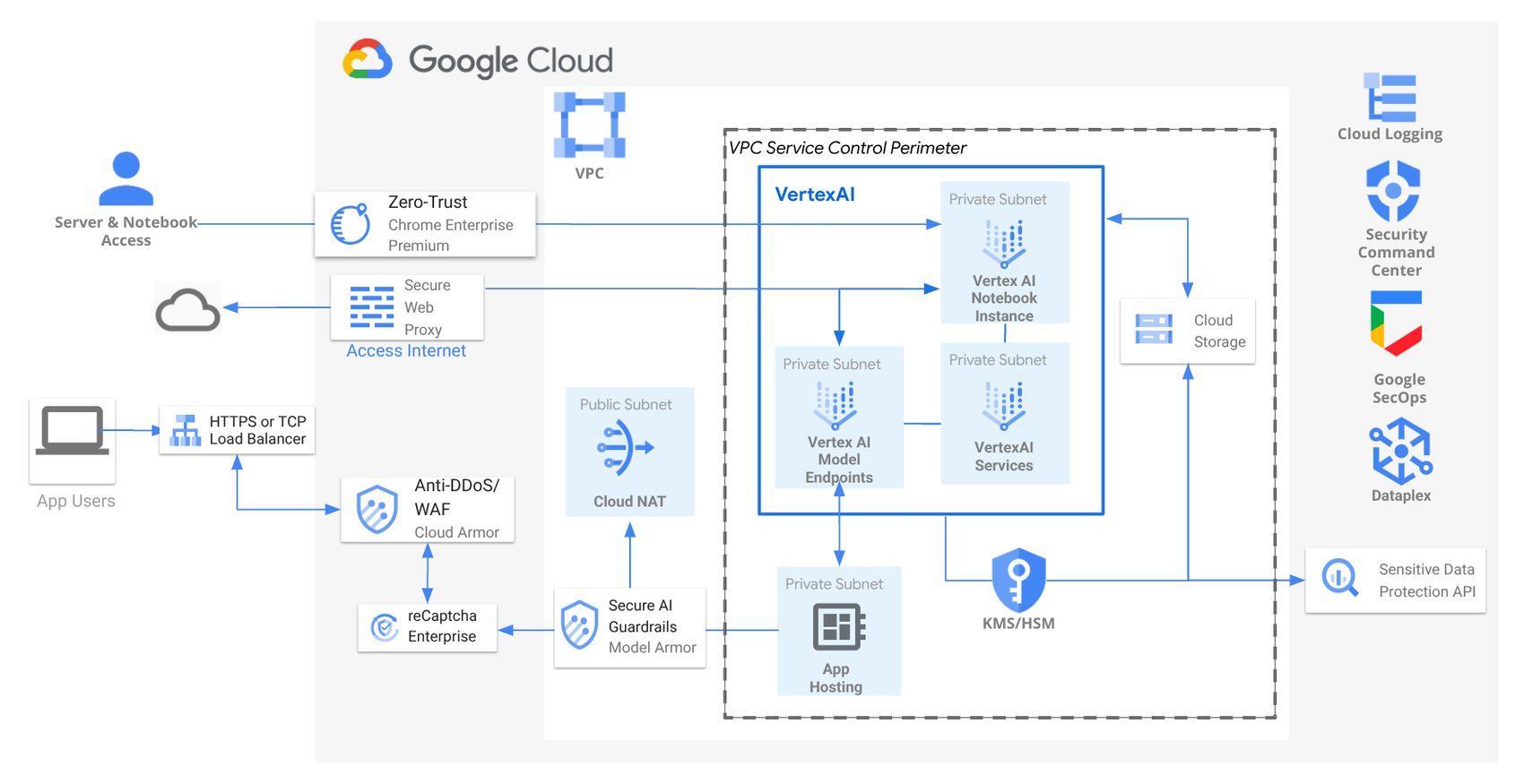
https://storage.googleapis.com/gweb-cloudblog-publish/images/1_Secure_AIML_Reference_Architecture.max-1700x1700.png

Most AI builders look good in isolation. Google AI Studio looks good in context.

First-Party Ecosystem Access

Because itโ€™s Google:

  • Gemini models are first-party, not bolted on
  • Grounding via Google Search is native
  • Data from Google Drive can be used without elaborate integrations

Less glue code. Less maintenance. Fewer things breaking at 2am.

Why That Matters for Businesses

For real organisations, speed isnโ€™t about typing faster. Itโ€™s about:

  • Fewer moving parts
  • Fewer vendors to manage
  • Fewer surprise costs as things scale

And thatโ€™s where ecosystems quietly win.


How It Stacks Up Against Other Platforms

This isnโ€™t a knock on existing tools. Many are excellent. But the differences are becoming clearer.

Replit

Strengths

  • Fast setup
  • Strong collaborative coding
  • Developer-friendly environment

Limitations

  • AI is more add-on than foundation
  • Hosting and usage costs appear quickly

Lovable

Strengths

  • Very fast AI app generation
  • Low friction for simple ideas

Limitations

  • Feature gating as you grow
  • Shallower multimodal capability

Where Google AI Studio Wins

  • First-party AI models
  • Multimodal by default
  • No immediate hosting or subscription pressure

Itโ€™s not about being โ€œbetterโ€.
Itโ€™s about being deeper.


The Hosting Question Everyone Asks

โ€œFreeโ€ always triggers suspicion. And fairly so. If you already have:

  • Hosting
  • Lab environments
  • Existing infrastructure

AI Studio can remain just the build layer. If you donโ€™t, Google hosting becomes the obvious next step.

Thatโ€™s not trickery. Thatโ€™s gravity. Google isnโ€™t hiding the business model. Theyโ€™re simply letting value appear before invoices do.


Why Google Is Really Giving This Away

This move isnโ€™t about charity. Itโ€™s about:

  • Lowering the barrier to experimentation
  • Letting teams prove value before committing spend
  • Encouraging builds inside Googleโ€™s wider ecosystem

The bet is simple:

If people build here, theyโ€™ll scale here.

Thatโ€™s not lock-in by force. Itโ€™s lock-in by convenience.


Why This Is Genuinely Good News for SMBs

For smaller businesses, this matters more than it does for enterprises.

  • You can test AI ideas without financial risk
  • You can move from idea to working tool quickly
  • You donโ€™t need a budget sign-off just to see if somethingโ€™s viable

The real challenge comes after success. Governance, cost control, and scaling sensibly. Thatโ€™s where strategy matters more than tooling.


The Bigger Picture

AI platforms are becoming the new operating layer for applications.The winners wonโ€™t be the ones with:

  • The most templates
  • The loudest marketing
  • The flashiest demos

Theyโ€™ll be the ones with:

  • Deep ecosystems
  • Clear paths from idea to production
  • Fewer friction points as things grow

Google AI Studio is an early signal of where this market is heading.


Final Thought

The question isnโ€™t whether businesses will use AI studios. Itโ€™s which ecosystem theyโ€™ll build in โ€” and how deliberately theyโ€™ll do it. Free tools are easy. Smart choices take a bit more thinking. And that thinking is where the real advantage sits.

Nxt Steps

If you’d like to explore how tools like Google AI Studio can transform your business, book a call with us today.

Another Microsoft price rise? Yes. And this one is worth your attention.

When Microsoft announces licensing changes, I see the same reaction from most business leaders.

A sigh. A shrug. And a quiet hope it can be dealt with at renewal time.

I understand why. Microsoft licensing rarely feels urgent until the invoice lands. But in this case, waiting is exactly how businesses end up paying more than they need to.

Microsoft has now confirmed global commercial price increases across Microsoft 365 and Office 365, effective from 1 July 2026. Some licences wonโ€™t change at all. Others rise by double digits. A few jump by more than 30%.

According to what weโ€™re seeing at Nxt Gen IT, this isnโ€™t a short-term tweak. Itโ€™s a clear signal of where Microsoft wants customers to be and what it expects them to pay for.

The good news? Thereโ€™s time to plan.
The bad news? Businesses that do nothing nearly always lose leverage.


A plain-English summary (read this first)

Hereโ€™s the headline view Iโ€™d want any UK business owner to understand:

  • Microsoft is increasing prices on selected Microsoft 365 and Office 365 commercial plans
  • The changes apply globally, including the UK
  • New pricing starts 1 July 2026
  • Some plans see no increase at all
  • Others rise sharply, especially frontline and entry-level licences
  • Renewals completed before July 2026 are not affected

That final point matters more than anything else in this article.


Whatโ€™s changing: plan-by-plan pricing increases

Microsoft has confirmed the following percentage increases from July 2026:

PlanPrice Change
Microsoft 365 Business Basic+16.7%
Microsoft 365 Business Standard+12%
Microsoft 365 Business Premium0%
Office 365 E10%
Office 365 E3+13%
Microsoft 365 E3+8.3%
Microsoft 365 E5+5.3%
Frontline F1+33%
Frontline F3+25%

A pattern jumps out immediately.


Who feels this most?

From my conversations with clients, the impact falls unevenly:

  • Small businesses using Business Basic or Standard feel the increase quickly. These licences are often chosen years ago and never revisited.
  • Frontline-heavy organisations are hit hardest, with 25โ€“33% increases affecting manufacturing, logistics, healthcare and retail
  • Mid-market firms see smaller percentage increases on E3 and E5, but at scale the total cost impact still adds up

Meanwhile, Business Premium and Office 365 E1 stay exactly the same and thatโ€™s not accidental.

Microsoft is clearly rewarding customers who adopt security and management rich licensing.


Why Microsoft is increasing prices

Microsoftโ€™s official position centres on long-term investment, including:

  • AI-powered productivity features
  • Advanced security and identity protection
  • Device and endpoint management
  • Compliance, governance and data protection tools

The company states that more than 1,100 new capabilities have been added in recent years.

From Microsoftโ€™s perspective, Microsoft 365 is no longer โ€œjust Officeโ€. Itโ€™s positioned as an AI-led productivity and security platform combining collaboration, identity, device management and threat protection in one licence.

The uncomfortable question is whether your business is actually using that value.

I regularly see organisations paying for Microsoft 365 as if itโ€™s still just email and Word, while Microsoft prices it as a strategic business platform. That gap is where frustration sets in.


What this means for UK businesses

For UK organisations, the impact is fairly straightforward:

  • Per-user licensing costs will rise from mid-2026
  • Frontline licences increase sharply
  • Business Premium and Office 365 E1 remain unchanged
  • Exchange rates may vary, but the percentage uplifts apply

In real terms, a 12โ€“17% increase across 40โ€“50 users can quickly mean thousands of pounds per year.

What concerns me more is how late many businesses notice. Usually at renewal time, when decisions feel rushed and options feel limited.


Renewal timing now matters more than ever

This is the part Iโ€™d encourage every business leader to read twice.

Microsoft has confirmed that renewals completed before 1 July 2026 are not subject to the new pricing.

That creates a genuine planning window.

Best practice looks like this:

  • Review Microsoft renewal dates now
  • Identify agreements expiring before July 2026
  • Consider early renewal where commercially sensible
  • Explore multi-year commitments to lock in pricing
  • Align licensing with wider IT and budget planning

Handled properly, businesses can delay (or even avoid) these increases in the short to medium term.

Left too late, that leverage disappears.


Cost versus value: an honest conversation

Not all price increases are bad. Some reflect genuine value.

For organisations actively using Microsoftโ€™s security stack, identity controls and device management, Microsoft 365 can replace several third-party tools. In those cases, higher licence costs may be offset elsewhere.

For many SMEs and frontline-heavy businesses, though, the increase feels disconnected from day-to-day use.

In my experience at Nxt Gen IT, the difference almost always comes down to licence alignment:

  • Who actually needs which licence
  • Which features are genuinely used
  • Where thereโ€™s duplication or waste
  • Where upgrading delivers real operational benefit

Microsoft is betting customers will move up the value stack. Each business needs to decide whether that move makes sense for them.


Practical next steps for IT and finance leaders

If youโ€™re responsible for IT, finance or operations, there are three sensible actions to take now:

1. Audit your Microsoft 365 licences

Understand who is on which plan and why, especially frontline users and long-standing assignments that havenโ€™t been reviewed.

2. Forecast your 2026 cost exposure

Model the impact based on headcount and growth plans. Donโ€™t wait for renewal-time surprises.

3. Speak to a trusted IT partner

A good Managed Service Provider helps you optimise, not just renew, whether thatโ€™s consolidation, rationalisation or strategic upgrades that genuinely add value.

This is where proactive IT support earns its keep.


Nxt Steps

Microsoftโ€™s 2026 pricing changes arenโ€™t a reason to panic. Theyโ€™re a reason to plan.

With clear notice, UK businesses have time to lock in pricing, optimise licensing, and ensure Microsoft 365 genuinely supports how the organisation works.

If youโ€™d like a plain-English review of how these changes affect your business, book a call with Ben Fielding and find out how Nxt Gen IT supports SMEs with Microsoft 365 optimisation, proactive IT support and long-term strategic IT direction.