
And What This Means For UK Businesses

Back in 1998, most of us were stuck with painfully slow dial-up connections. Every time we went online, it tied up the phone line and trickled data through at just 56kbps, if you were lucky. That kind of speed wouldn’t even load a basic web page today.

Fast forward to 2025 and the story has flipped. The UK now has widespread access to ultrafast fibre, regularly offering us speeds of up to 1000Mbps. That’s 1,000,000 Kbps. So, we’ve seen an 18,000 multiplier in speeds!

Even more astonishing, we get this for less than half the inflation-adjusted cost of what we were paying two decades ago.

Thatโ€™s not just a technical upgrade. Itโ€™s a major shift in whatโ€™s possible.


The Broadband Revolution: Visualised

Take a look at how things have changed:
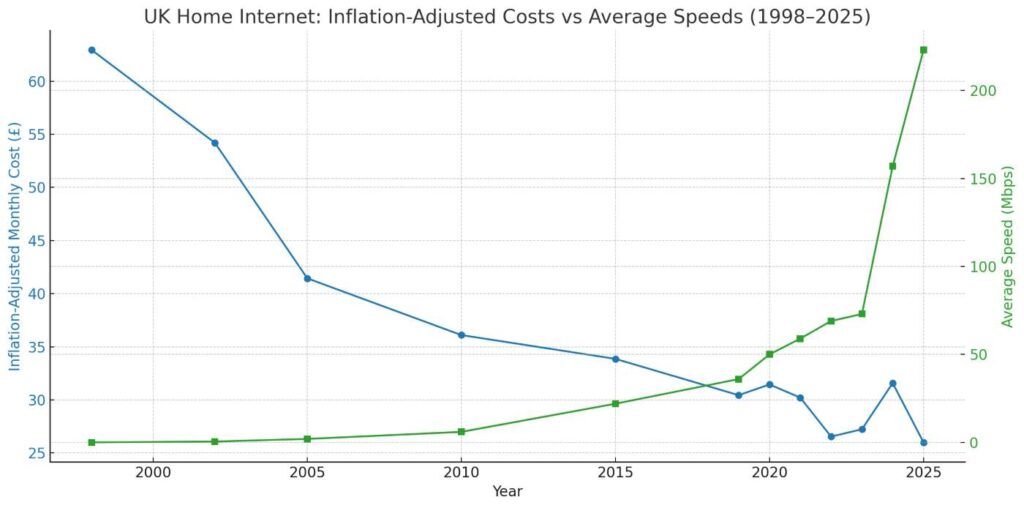
This chart tells a powerful story:

  • In 1998, businesses were paying around ยฃ63/month (adjusted for inflation) for basic 56 Kbps dial-up
  • In 2025, the average cost is around ยฃ26/month for 223 Mbps on average
  • Even with just taking the average UK speeds, thatโ€™s over 4,000 times faster, at less than half the cost

Whatโ€™s most striking is the recent leap. In just the past few years, average speeds have soared while costs have continued to fall.

We are now living in the most connected, accessible, and cost-efficient era of internet connectivity the UK has ever seen.


Five Lessons for UK Businesses

1. Youโ€™re Getting More for Less

The value of broadband has skyrocketed. Ultrafast fibre is no longer a luxury or a city-only feature. Itโ€™s now the starting point. That levels the field for small firms, startups, and regional businesses alike.

Cloud software, video meetings, and remote access used to be high-bandwidth luxuries. Today, theyโ€™re well within reach, both financially and technically.

2. The Bottleneck Is No Longer Your Internet

Your connection is ready. The real question… is your business ready?
Outdated processes, legacy systems, and slow decision-making are now bigger blockers than the network. The businesses that will thrive are those that adapt fast. Automating, streamlining, and empowering teams with real-time tools.

3. Geography Is No Longer a Limiting Factor

With fibre rolling out nationally, rural firms can now operate on a level digital playing field. Whether you’re in central London or a converted barn in Yorkshire, your connectivity can support hybrid teams, cloud systems, and national growth.

This opens up new opportunities for recruitment, expansion, and remote-first business models.

4. Digital Transformation Is the New Standard

Thereโ€™s no excuse for slow, manual workflows anymore. The infrastructure is here. The tools are mature. Businesses that still havenโ€™t digitised key operations are falling behind.

And it’s not about tech for tech’s sake. It’s about responsiveness, customer experience, and resilience.

5. Weโ€™re Entering the ‘Smart Everything’ Era

Whether itโ€™s AI-powered chat, predictive analytics, or connected devices in logistics and manufacturing, high-speed connectivity is what powers it all.

As smart technologies become more embedded into everyday operations, businesses will need an IT backbone thatโ€™s not just fast. It’s future-proof.


So, What Does This Mean for the Future?

The last 25 years of broadband progress have knocked down a major barrier to innovation. The infrastructure is in place. The price is right. The speed is more than enough.

Now, the opportunity lies in how you use it.

Firms that still treat IT as a support function risk missing the bigger picture. Technology is no longer a cost to manage. Itโ€™s a lever to grow, scale, and compete.


Whatโ€™s Next for Your Business?

At Nxt Gen IT, we help forward-thinking organisations turn connectivity into capability. From cloud migrations and remote-ready infrastructure to IT strategy and support, we make sure your tech stack is ready for whatโ€™s next.

Letโ€™s talk about how your business can make the most of todayโ€™s connectivity.

Struggling to stay cool at work? You’re not the only one.

With the recent heatwaves, weโ€™ve had more than a few clients ask, โ€œIs it safe to keep working when itโ€™s this hot?โ€ and โ€œCan the temperature damage our laptops?โ€. If your office doesnโ€™t have air conditioning, or itโ€™s simply not keeping up, there are some practical ways to help both your team and your tech stay cool. Hereโ€™s how to keep things comfortable and avoid any unwanted heat-related hiccups.


Turn It Off

It sounds simple, but itโ€™s easy to forget. If somethingโ€™s not in use, turn it off. Not just your computers, but printers, monitors and other desk gear too. All of it gives off heat when powered up.

Consider using smart plugs or timers to cut power outside working hours. Itโ€™s a small change that can make a surprising difference to the temperatureโ€”and your electricity bill.


Be Strategic With Windows

Fresh air helps, but only if thereโ€™s a breeze. Opening windows on a still, hot day can just let more warm air in. Best times to let in cooler air are early morning or late evening.

If youโ€™ve got windows on both sides of the office, create cross-ventilation by opening both and using a fan to draw air through.


Keep the Sun Out

Direct sunlight pouring into your workspace will quickly raise the room temperature. Keep curtains or blinds drawn, especially during the hottest part of the day (typically 11am to 3pm). Reflective window film is another option if you’re looking for a longer-term fix.


Move Downstairs

Heat rises. So if you’re working in a two-storey office, try setting up downstairs where itโ€™s naturally cooler. If youโ€™ve got a loft or attic space, opening the hatch can also help release some of the trapped heat from the upper floors.


Cooling Tips That Work

There are lots of small hacks that can make your workspace feel more bearable in hot weather:

  • Use fans to keep air moving. Even a desk fan pointed in the right direction can help.
  • Keep a cold drink to hand. Hydration makes a big difference to how your body handles heat.
  • Soak your feet in cool water. It might sound odd, but cooling your feet helps your body regulate heat more efficiently.
  • Dress for the heat. Lightweight, breathable fabrics like cotton and linen are your best bet.

Protecting Your Tech

Computers and laptops donโ€™t perform well in high temperatures. Overheating can cause slowdowns, crashes and long-term damage.

Hereโ€™s how to keep your devices safe:

  • Keep laptops off soft surfaces like laps or cushions, which block airflow. Use a stand to let air circulate.
  • Point a fan at your laptop or use a cooling pad if the room is particularly warm.
  • Keep desktops and other kit out of direct sunlight, and donโ€™t store them in enclosed cabinets.
  • Clean vents and fans regularly to remove dust that restricts cooling.
  • Tweak power settings to reduce load on the CPU, especially when youโ€™re not running intensive tasks.

If your office runs multiple machines, even a modest temperature rise across the board can make a big difference. Monitoring performance and heat levels during hot weather is key.


Nxt Steps

Not every office has the luxury of built-in air conditioning, but that doesnโ€™t mean youโ€™re powerless. A few smart changes can help your people stay comfortable and your tech stay protected.

If you’re unsure whether your current IT setup can handle the heat, we can help. From hardware audits and ventilation advice to proactive support and system monitoring, Nxt Gen IT makes sure your systems run smoothly, whatever the weather.

Ready to keep your cool? Letโ€™s chat about how we can support you this summer and beyond.

Are You Using These Basic Features?

When youโ€™re running a business, IT can feel like a constant juggling act. Do we need to upgrade our systems? Are we keeping up with cyber threats? Whatโ€™s the next โ€œmust-haveโ€ app?

But here’s something weโ€™ve learned from years of supporting UK-based SMEs. Sometimes itโ€™s not the shiny new software or complex infrastructure that makes the biggest difference. Itโ€™s the little features. The ones hiding in plain sight. The ones that quietly save time, reduce hassle, and keep your team moving.

At Nxt Gen IT, weโ€™re all about practical solutions that make real life easier. So hereโ€™s a nod to the unsung heroes of everyday tech… the simple features that consistently punch above their weight.


Ctrl + Z: Saviour of Your Sanity

Weโ€™ve all been there. A spreadsheet suddenly looks like abstract art. An email is halfway to a client and itโ€™s missing the attachment. Enter Ctrl + Z. It might be the most-used keystroke in the business world, and for good reason. Itโ€™s instant damage control, no training required.


Out-of-Office Replies: Set and Forget

This oneโ€™s a classic. A simple auto-reply does more than tell people youโ€™re away. It manages expectations, keeps projects moving, and shows your business is well-organised, even when youโ€™re on holiday. Bonus points if it includes a colleagueโ€™s contact details, and you can set it up way in advance. Booking some holiday? Set your Out Of Office at the same time.


Search That Works (Properly)

Weโ€™ve seen businesses spend hours looking for one file or one email. A smart, reliable search function in your email, CRM, or cloud storage isnโ€™t just a โ€œnice to haveโ€. Itโ€™s a massive time-saver. Better search means fewer headaches. Search for tips on power-searches for your app of choice to find out if there’s tips that help you find things faster. Looking for an email in Outlook from one of the Brians (your forget which) about holiday? Search “from:brian holiday”.


Two-Factor Authentication: Quick to Set Up, Tough to Beat

Cybersecurity doesnโ€™t have to be complex. Enabling two-factor authentication (2FA) takes minutes but adds a serious layer of protection. Especially if you’re using Microsoft 365, itโ€™s one of the easiest ways to shut the door on cyber threats.


Pin to Taskbar: Your Three Most-Used Apps, One Click Away

Itโ€™s basic, but it works. Pinning your core apps (Outlook, Teams, browser) to your taskbar means no more hunting through menus. For anyone starting their day in the same few places, this small tweak smooths out the morning rush. Did you know you can also pin documents you use on a regular basis?


Built-In Snipping Tools: Screenshots Made Simple

Forget clunky third-party software. Whether itโ€™s Snip & Sketch on Windows or Shift + CMD + 4 on Mac, built-in snipping tools are perfect for grabbing quick visuals. Theyโ€™re ideal for support teams, training guides, or just showing a colleague what you mean.


Do Not Disturb: The Focus Button You Didnโ€™t Know You Needed

Notifications are the enemy of deep work. Activating Do Not Disturb on your phone, your PC, or even in Teams gives you the headspace to get things done. It’s a one-click barrier between you and the ping-ping of distraction.


Scheduled Send: Smart Timing, Made Easy

Need to send an email first thing, but donโ€™t want to hit โ€˜sendโ€™ at 11pm? Scheduling emails in Outlook or Gmail is a great way to time your messages for when theyโ€™ll land best. Itโ€™s especially handy if youโ€™re working across different time zones or managing client expectations.


Why Simple Works

The truth is, simple features get used. They donโ€™t need training. They donโ€™t cause confusion. And they donโ€™t fail at the worst possible time.

At Nxt Gen, our job isnโ€™t just to introduce new tech. Itโ€™s to make sure your current tools are working for your people. And often, that means helping you get more out of the basics.


Ready to Simplify?

If your systems feel more complicated than they should, letโ€™s talk. We can help you spot the quick wins already at your fingertips and suggest upgrades that stay simple, secure, and smart. Get in touch today.


Nxt Steps

Looking to streamline your IT without reinventing the wheel? Weโ€™re here to help. Whether itโ€™s uncovering unused features or improving everyday workflows, weโ€™ll guide you through smarter tech choices… without the jargon.

No More Awkward Waiting While Someone Fumbles With Slides

How many times have you been in a Teams meeting, waiting while someone fumbles with the slides, saying: โ€œNext slide, pleaseโ€ฆโ€?
Youโ€™re not alone and if your business runs online meetings or webinars regularly, youโ€™ve probably seen how those awkward handovers chip away at your teamโ€™s confidence and professionalism.

At Nxt Gen IT, we hear this all the time:

โ€œOur meetings are fine but they could run a lot smoother.โ€
โ€œItโ€™s frustrating when presenters canโ€™t just control their own slides.โ€
โ€œIt doesnโ€™t feel polished when someone has to ask to move things along.โ€

Good news. Microsoft has finally released a fix for this long-standing Teams frustration.

Meet Co-Presenter Slide Control in Teams

Until now, only one person could control the slide deck in a Teams meeting. If you were co-presenting, it meant constant interruptions, asking someone else to move to the next slide, often derailing your flow.

Now, Microsoft is rolling out a feature that lets multiple people control the presentation slides in a meeting. That means you can smoothly hand off between presenters, each taking control when itโ€™s their turn. No delays, no awkward prompts.

Why this matters for your business:

  • ๐Ÿ‘ฅ Better Collaboration: Your sales, training, or leadership teams can present together without the clunky back-and-forth.
  • โฑ๏ธ Time-Saving: No more wasted minutes waiting for someone to click โ€œnext.โ€
  • ๐Ÿ’ผ More Professional Meetings: When transitions are seamless, your team looks sharper, especially in client-facing calls or webinars.

It might seem like a small change, but this kind of improvement can make a big difference in how your business comes across on screen.

When and How Youโ€™ll Get It

The feature is already rolling out, starting with the Windows desktop version of Teams. As the meeting organiser, youโ€™ll likely be able to assign co-presenters when setting up the session. Once thatโ€™s done, each presenter can take control of the deck without interrupting the flow.

And if youโ€™re wondering, yes. It should have been here ages ago. But at least now, Teams is catching up to the way modern businesses actually work.

Microsoft Teams Is Getting Smarter

This isnโ€™t the only upgrade Microsoft has made recently. Features like in-call live chat, background noise suppression, and smarter meeting recaps are all designed to support more flexible, intuitive working.

But to get the most out of Teams, and Microsoft 365 in general, you need more than just the right tools. You need them set up strategically, customised to how your business operates.

Thatโ€™s where we come in.


Nxt Steps

Whether you’re running daily team huddles, board meetings, or monthly webinars, Nxt Gen IT can help you make Microsoft Teams work harder (and smarter) for your business.

From setup and training to Microsoft 365 strategy and support, weโ€™ll help you streamline collaboration and reduce distractions so meetings stop being a source of frustration.

Letโ€™s make โ€œNext slide, pleaseโ€ a thing of the past.
Get in touch today โ†’

โ€œTheyโ€™d never fall for that.โ€

Itโ€™s what many business leaders think about their teams when it comes to phishing scams. After all, your people are smart, switched on, and theyโ€™ve heard the warnings before. They know not to click on dodgy links or open unexpected attachmentsโ€ฆ right?

But hereโ€™s the catch. Confidence can be a risk in disguise.

When Confidence Becomes Complacency

At Nxt Gen IT, weโ€™ve seen it time and time again. Employees who genuinely believe they can spot a scam, but still get caught out. According to recent research, a whopping 86% of employees say theyโ€™re confident in identifying phishing emails. But over half of them have already fallen victim to one.

That disconnect? Itโ€™s exactly what cyber criminals are banking on.

Todayโ€™s phishing attacks donโ€™t look like spammy messages from a โ€œforeign prince.โ€ They look like:

  • A payment reminder from a trusted supplier.
  • An internal request from your finance team.
  • A Microsoft login page that seems completely legit.

And when someoneโ€™s overconfident, theyโ€™re less likely to pause, question, or double-check. Thatโ€™s when things go wrong.

The Dunning-Kruger Effect, in Action

This psychological concept explains how people with limited knowledge often overestimate their ability. In cyber security, that might look like someone clicking a link because theyโ€™re sure they know what a phishing email looks like… until they donโ€™t.

Overconfidence leads to shortcuts. And shortcuts lead to breaches.

So, What Can You Do About It?

Start with mindset.
Awareness training isnโ€™t about scaring your team. Itโ€™s about equipping them. Phishing awareness sessions, when done right, help employees recognise the more subtle, well-crafted threats that go unnoticed until itโ€™s too late.

But training alone isnโ€™t enough.

You also need a culture that encourages reporting. If employees feel embarrassed or fear being blamed, theyโ€™ll stay quiet. That silence gives cyber criminals the upper hand. Instead, create an environment where flagging something suspicious is second nature, not a cause for concern.

Because cyber security isnโ€™t just a tech problem. Itโ€™s a people problem. And the solution lies in ongoing education, open communication, and a healthy dose of humility.


Nxt Steps

If you’re serious about dealing with your potential cyber security weakness, itโ€™s time to go beyond firewalls and antivirus software. Let Nxt Gen IT help you build a team thatโ€™s not just informed, but truly empowered to stay vigilant.

Ask us about phishing simulation training, reporting tools, and how to create a culture of cyber awareness.

Get in touch today.

โ€œWeโ€™ve always done it this way.โ€

Itโ€™s a phrase we hear often, especially when it comes to spreadsheets. Theyโ€™ve been the go-to business tool for decades. Familiar. Flexible. And letโ€™s be honest, who doesnโ€™t feel like a wizard when a formula finally works?

But hereโ€™s the issue: spreadsheets might feel safe, but in reality, theyโ€™re slowing you down. Badly.

The Hidden Cost of Clinging to Spreadsheets

At Nxt Gen IT, we talk to business leaders every day who are frustrated by the same problems:

  • Manually inputting data.
  • Fixing formula errors.
  • Tracking multiple versions of the same file.
  • Wondering who changed what and when.

Itโ€™s not just a time-suck. Itโ€™s a risk.

Despite big plans for digital transformation, research shows a huge gap between intention and action. While 82% of businesses say automation is on their radar, only 43% actually plan to implement it within the next 12 months.

That means most companies are stuck in spreadsheet limbo, dealing with the same inefficiencies year after year.

What Could You Be Doing Instead?

Imagine a day where:

  • Data flows into your systems automatically.
  • Reports generate themselves in real time.
  • Mistakes are caught before they cause problems.
  • Team members access the right version. Every time.

Thatโ€™s what automation delivers. It replaces the manual slog with smart, secure, and scalable solutions.

Better still, most automation tools come with built-in access controls and audit trails, so you know exactly whoโ€™s doing whatโ€”without worrying about sensitive data slipping through the cracks.

But… What If Change Feels Too Big?

We get it. Spreadsheets feel comfortable. Familiar. Swapping them out can feel like a leap. But the truth is, you donโ€™t have to rip everything up and start again.

Start small.

Pick one area thatโ€™s clearly draining your time, like managing invoices, chasing payments, or pulling monthly reports. Let automation do the heavy lifting there.

Once you see how much smoother and faster things run, youโ€™ll realise spreadsheets were holding you back more than helping you forward.


Nxt Steps

If you’re ready to stop firefighting spreadsheet errors and start building smarter systems, letโ€™s talk. Whether it’s workflow automation, cloud reporting, or system integration, Nxt Gen IT can help you modernise, without the drama.

Get in touch today to find the right-fit solution for your business.

Think Before You Click

โ€œCan you just turn this into a PDF?โ€
Itโ€™s a familiar request. Maybe a colleague needs to share a report with a client or someoneโ€™s preparing slides for a meeting. You type a quick search into Google: free Word to PDF converter. Dozens of websites pop up, all promising a simple solution.

You click. Upload the file. Get the download. Job done.

Or so it seems.

What many people donโ€™t realise is that some of these โ€œfreeโ€ tools come with serious hidden risks. Enough for the FBI to issue a formal warning.

The Real Cost of Free Tools

Criminals know most users are in a hurry. They donโ€™t have time to vet every link or question every free service. And thatโ€™s exactly what makes these file converter sites such an easy target.

Some of them do what they promise. They convert your file. No problem there. But at the same time, they may be installing malware or setting up a path to deliver ransomware in the background.

Thereโ€™s no warning. No flashing red flags. Just a smooth process and a risk you wonโ€™t notice until itโ€™s too late.

What Can Malware Actually Do?

Malware is short for โ€œmalicious softwareโ€ and includes any code installed without your knowledge thatโ€™s designed to cause harm.

Some types monitor your activity. Others steal login credentials or give an attacker access to your files. One of the most dangerous is ransomware. It locks down your data, making it completely inaccessible unless you pay to get it back. Even then, thereโ€™s no guarantee the files will be restored.

Itโ€™s not just the files on your machine either. If youโ€™re connected to a shared network, ransomware can spread across your business, halting operations and putting client data at risk.

How These Tools Steal Sensitive Data

Some free conversion tools donโ€™t bother with complex malware. Instead, they simply extract information from the files you upload. They scan documents for personal or business data. Things like client names, invoices, contracts or login credentials.

If youโ€™ve ever uploaded a document containing customer details or business-critical information, that data could now be sitting in the hands of someone with no business having it.

And because these tools often appear trustworthy and professional, thereโ€™s rarely a second thought before using them.

Why Your Business Shouldnโ€™t Take the Risk

Every business needs to convert files. Whether itโ€™s for sharing, archiving or formatting, itโ€™s part of everyday work. But relying on unknown or unvetted online tools leaves the door wide open to cyber threats.

The good news is you donโ€™t need to take the risk.

There are safe, secure alternatives already built into the tools many businesses use every day. Microsoft 365, Adobe Acrobat and other professional platforms offer reliable file conversion, backed by strong security and data protection. No surprise installations. No hidden data harvesting.

But technology alone isnโ€™t the answer. Itโ€™s also about awareness. Most file-based threats start with someone trying to do a quick task using whatever they can find. Thatโ€™s why training and clear IT policies are just as important as the tools themselves.

Protecting Your Team From Everyday Cyber Threats

The first step is understanding where your team may be cutting corners. Are they using personal devices? Uploading files to unfamiliar websites? Downloading free tools without approval?

These are the moments where risk creeps in. And theyโ€™re completely avoidable with the right setup.

Consider:

  • Using enterprise-grade software with built-in file conversion features
  • Setting up security filters to block access to suspicious websites
  • Providing guidance on which tools are approved and which arenโ€™t
  • Monitoring endpoints for unauthorised software or uploads

If your current setup doesnโ€™t give your team easy, secure ways to handle day-to-day tasks, it might be time for a review.

Nxt Steps

If your staff are relying on quick fixes theyโ€™ve found online, itโ€™s a sign that your systems may need some fine-tuning. At Nxt Gen IT, we help businesses eliminate risky workarounds by putting secure, user-friendly solutions in place.

We can review the tools your team is using, replace high-risk processes with safer options and help you build a culture of security awareness.

To find out how we can help protect your business from everyday cyber risks, get in touch today.

No stress. No scare tactics. Just smart IT that works.

But Itโ€™s Time to Rethink Your Hardware Refresh Strategy

โ€œWhere did I save that file again?โ€
Youโ€™ve said it. Your teamโ€™s said it. Maybe even five minutes ago.

You remember writing it. You remember the project. Youโ€™re even sure it was last month. But when you try to search in Windows, itโ€™s like your PC has never heard of it.

Instead of help, it throws up a tangle of web results, outdated documents, and frustration.

If that sounds all too familiar, hereโ€™s the good news: Microsoft is finally doing something about it. But thereโ€™s something important to know before you get too excited.


A More Human Way to Search

A new Windows 11 update brings natural language search. That means you can type something like:

  • โ€œFind the notes from the July project meetingโ€
  • โ€œShow me pictures of the team at the summer BBQโ€

And Windows will understand what you mean, even if you canโ€™t remember the exact file name or location.

Itโ€™s search that actually works the way people think. And it has the potential to save serious time across your business.


What Youโ€™ll Need: A Copilot+ PC

This feature isnโ€™t coming to every device. To use natural language search, youโ€™ll need one of Microsoftโ€™s new Copilot+ PCs.

These are next-generation machines designed specifically for AI-powered features. They include a chip called an NPU (Neural Processing Unit), which runs AI tasks locally on your device. That means faster performance and better privacy, without relying on the internet.

Copilot+ PCs unlock all sorts of new productivity tools, including:

  • Natural language file search
  • Microsoft 365 Copilot, built into Word, Outlook, and Excel
  • Local image generation
  • Smarter file and photo recognition

Right now, this new search feature is only available in preview versions of Windows 11 for Copilot+ PCs. But itโ€™s expected to roll out more widely very soon.


Planning a Hardware Upgrade? Think Long-Term

If youโ€™re considering upgrading your teamโ€™s computers, itโ€™s worth thinking about whether Copilot+ PCs could be a good fit. But hereโ€™s the trap many businesses fall into.

They buy everything at once.

Three years later, every device is suddenly out of date at the same time. And youโ€™re hit with a big, unexpected replacement bill. The budget takes a hit, and youโ€™re forced into rushed decisions under pressure.


Spread the Cost with a Rolling Refresh Programme

At Nxt Gen IT, we help businesses avoid this problem by planning smarter. With a rolling hardware refresh programme, you replace a manageable number of devices each year, not all at once.

Hereโ€™s what that looks like:

  • We assess your current devices and performance needs.
  • We build a custom plan to upgrade a set number of machines annually.
  • You spread the cost and avoid nasty surprises.
  • Your team always has up-to-date tools, ready for features like Copilot and AI-powered search.

Itโ€™s not just about controlling costs. Itโ€™s about giving your business the flexibility and performance it needs to grow.


Nxt Steps

AI features like Copilot are transforming the way people work. But they only run well on the right devices.

If youโ€™re wondering whether nowโ€™s the time to start refreshing your hardware, or you want to get ahead of the curve with a rolling upgrade plan, Nxt Gen IT are here to help.

Letโ€™s talk about:

  • Whether Copilot+ PCs are right for your business
  • How to phase in new devices without blowing your IT budget
  • What tools could save your team time and improve productivity

Get in touch with Nxt Gen IT today. Letโ€™s put a plan in place that works for your business, your budget, and your team.

โ€œWhy is my internet crawling today?โ€

If youโ€™re working from home and your connection suddenly slows to a crawl during the school holidays, you’re not imagining things. And no, itโ€™s not always your Wi-Fi to blame. Even the fastest broadband connections (including so-called โ€œfull fibreโ€) can fluctuate based on demand. Thatโ€™s because most broadband connections in the UK are contended, meaning youโ€™re sharing infrastructure with your neighbours. The more people online at once, the more strain on the network.

Ever noticed those cheeky โ€œup toโ€ speed promises in broadband adverts? Thatโ€™s the giveaway. Providers know your actual speed can vary, depending on how busy the network is at any given time.

During half-terms, Easter breaks and those long summer weeks, home broadband networks get noticeably busier. And itโ€™s not just inside your house. This shared activity can have a surprising impact on your internet performance.

So, why is this happening, when does it tend to occur, and how do you keep your connection stable even during the busiest times?

Why Your Internet Slows Down During School Holidays

Most people think their broadband connection is private. But hereโ€™s the thing…if you’re on a shared network infrastructure, like most fibre and cable broadband users in the UK, your internet speed can be affected by your neighboursโ€™ activity. This is especially common during:

  • School holidays, when children are at home streaming and gaming
  • Rainy days, when everyone stays indoors and online
  • Afternoons and early evenings, when homes are at their busiest

When multiple households in your area are streaming video, downloading games or watching high-definition content at the same time, it can put extra strain on the local broadband cabinet. This can cause slower speeds, higher latency and more connection dropouts for everyone connected.


Peak Times to Watch Out For

Here are some typical high-usage periods when your connection may take a hit:

DayPeak TimesActivity
Weekdays during school holidays10am to 12pmStreaming, gaming and YouTube
Weekdays3pm to 6pmChildren return home and get online
Evenings7pm to 10pmFamilies streaming films or gaming
Rainy weekendsAll dayHigher indoor activity and internet use

If youโ€™re trying to work during these periods, it might explain the buffering, dropped calls or slow downloads.


What Can You Actually Do About It?

You canโ€™t control what your neighbours are doing online. But there are a few simple ways to protect your internet performance during busy times.

1. Use a Wired (Ethernet) Connection

A wired connection is much more stable and consistent than Wi-Fi. You avoid interference from other devices and your speed is not as affected by whatโ€™s happening elsewhere on the network.

If running a long cable doesn’t seem practical, contact Nxt Gen IT. Our cabling engineers can work wonders.


2. Schedule Important Tasks Outside of Peak Hours

If your day allows for some flexibility, try to schedule large uploads, backups or key video calls for earlier in the morning or later in the evening, when network congestion is lower. Even small changes to your working hours can make a difference.


3. Switch to the 5GHz Wi-Fi Band

Many routers now offer both 2.4GHz and 5GHz Wi-Fi bands. The 5GHz band tends to be faster and experiences less interference from other household devices. If your computer or phone supports it, switching to the 5GHz option can improve your wireless speed.


4. Upgrade Your Router or Install a Dedicated Wi-Fi System

Entry-level routers from internet providers often struggle to handle multiple devices, especially when the network is under pressure. Upgrading to a business-grade router or investing in dedicated wireless access points can help maintain strong, steady coverage throughout your home. Multiple access points distribute the signal more evenly, reducing weak spots and buffering.


5. Consider FTTP or Business-Grade Broadband

If you regularly experience slow speeds during school holidays, you may want to upgrade your connection.

FTTP (Fibre to the Premises) provides a direct fibre line to your home, avoiding the shared copper infrastructure that causes bottlenecks. Business-grade broadband options also come with better performance guarantees and prioritised bandwidth.

We can help you check whatโ€™s available in your area and advise on the best option for your needs.


6. Use a Mobile Hotspot as Backup

If your lucky enough to be in an area with good 4G or 5G coverage, a mobile hotspot can be a useful fallback when your main connection slows down. Whether through your smartphone or a dedicated device, itโ€™s handy for video calls or urgent tasks during peak times. Just keep an eye on your data usage if you’re on a capped plan.


Nxt Steps

You donโ€™t have to put up with slow speeds every time the schools break up. While you canโ€™t control the entire streetโ€™s internet usage, you can take proactive steps to keep your connection smooth and reliable.

At Nxt Gen IT, we support home workers, hybrid teams and business owners with tailored broadband advice, equipment upgrades and expert remote support.

Need help improving your home internet setup?
Get in touch. Weโ€™ll help you stay productive, connected and ready for whatever the school calendar throws at you.