As the year comes to a close, most business leaders naturally start looking ahead.

New objectives. New opportunities. New plans for growth.

But some of the most effective planning for 2026 will not come from adding more initiatives, tools, or processes. It will come from making deliberate decisions about what not to take forward from 2025.

In the previous two articles in this series, we looked at resilience and AI adoption. We explored how businesses coped when things went wrong, and how quickly emerging technologies became part of everyday operations.

This article focuses on something less talked about, but just as influential: the operational weight your business is carrying into the new year.


Growth feels harder when the business is heavier

In 2025, many organisations did not struggle due to a lack of ambition, capability, or effort.

They struggled because everyday work required more energy than it should have.

Extra steps in simple processes. Manual fixes that never quite disappeared. Duplicate systems doing similar jobs. Workflows designed for a version of the business that no longer exists.

This kind of friction rarely appears overnight. It builds gradually, often during periods of fast change, where speed takes priority over structure.

By the time things settle, inefficiency has quietly become the norm.


How this links to resilience and AI

That operational drag connects directly to the themes we have already explored.

A business weighed down by friction tends to:

  • respond more slowly when disruption hits
  • rely heavily on individuals instead of systems
  • struggle to get consistent value from new technology
  • experience change as stressful rather than strategic

In 2025, resilience proved to be about more than security controls or backup strategies. It was about clarity and simplicity.

And AI was not just about productivity gains. It was about intention and alignment.

The same principle applies here. Simplification is not about stripping things back for the sake of it. It is about ensuring technology supports how the business actually operates today, not how it operated two or three years ago.


The opportunity many leaders overlook

Reducing friction is not glamorous work. It does not come with flashy launches or sweeping transformation programmes.

But it creates something far more valuable going into 2026: capacity.

When systems genuinely support people:

  • teams spend less time working around problems
  • decisions become easier and faster
  • data becomes more trustworthy
  • change feels manageable rather than disruptive

In practical terms, this often involves:

  • reviewing tools introduced quickly over the last few years
  • consolidating overlapping platforms
  • updating processes that no longer fit the business
  • reducing reliance on workarounds and key individuals

Each improvement may seem small on its own, but together they remove weight from the organisation.


A useful pause before planning 2026

Before setting budgets, targets, or roadmaps, it is worth stepping back and asking a few simple questions:

  • Which parts of the business feel heavier than they should?
  • Where do people lose time to friction rather than meaningful effort?
  • If we were starting today, which systems or processes would we design differently?
  • What are we maintaining out of habit rather than value?

These questions do not demand immediate answers. What they create is clarity, and clarity is what turns good intentions into good decisions.


Making 2026 easier, not just bigger

One of the clearest lessons from 2025 is that progress does not always come from acceleration.

Often, it comes from removing obstacles.

The businesses that perform best in 2026 will not necessarily be the ones doing the most. They will be the ones doing the right things with less resistance.

Resilience improves when systems are simpler.
AI delivers more value when processes are clearer.
Growth feels more achievable when the business is lighter.

That is not a technical challenge. It is a leadership one.


A closing note from Nxt Gen IT

This article brings our Christmas reflection series to a close.

Across all three pieces, the message has been consistent:

  • learn from what 2025 revealed
  • be intentional about how technology supports the business
  • design 2026 with clarity, not urgency

If there is one idea to carry into the new year, let it be this:

Better technology outcomes come from better decisions, not more tools.

We wish you a calm end to the year and a confident, well-designed start to 2026.

Nxt Steps

If you’d like to explore this or any others topics we’ve covered, book a meeting with Ben Fielding.

In 2025, AI stopped being a future concept and became part of everyday work.

Emails were drafted with it.
Documents were summarised by it.
Data was analysed through it.
Decisions were influenced by it. Sometimes consciously, sometimes not.

Tools like ChatGPT and Microsoft Copilot quietly embedded themselves into daily workflows across many of the businesses we work with at Nxt Gen IT. Often without a formal rollout. Rarely with a clear strategy.

That isnโ€™t a criticism. Itโ€™s simply how fast the shift happened.

But as we look towards 2026, one question matters more than any other:

Was your use of AI deliberate (or just active)?

Using AI is easy.
Using it well takes intent.


When AI became normal, quickly and quietly

One of the defining characteristics of 2025 was how fast AI blended into routine work.

Teams experimented. Leaders encouraged curiosity. Productivity gains appeared in pockets of the business.

At the same time, new risks and frustrations emerged just as quietly.

We saw organisations where:

  • AI saved hours on admin, but introduced inconsistency in tone and quality
  • multiple AI tools were used with no shared standards
  • sensitive data was pasted into public platforms without much thought
  • output was trusted because it sounded confident, not because it was verified

None of this suggests AI adoption was a mistake.

It highlights a simple truth: activity alone doesnโ€™t equal advantage.


AI adoption is a leadership challenge, not a technical one

AI isnโ€™t primarily an IT problem.

Itโ€™s a leadership one.

Most business leaders donโ€™t need to understand how large language models work. What they do need clarity on is:

  • where AI is being used across the business
  • what type of data is going into those tools
  • how AI-generated output is reviewed or validated
  • which decisions are influenced by it

In 2025, many organisations landed in an uncomfortable middle ground.

AI wasnโ€™t banned, but it wasnโ€™t governed either.
It existed somewhere between encouragement and avoidance.

That grey area is where most of the risk and missed opportunity sits.


Productivity gains vs decision quality

AI excels at speed. Thatโ€™s a big part of its appeal.

The challenge is that speed can mask problems:

  • errors spread faster
  • assumptions go unchecked
  • weak prompts produce confident but flawed output
  • human judgement is deferred rather than enhanced

The businesses that gained the most from AI in 2025 treated it as a supporting tool, not a decision-maker.

They were clear on:

  • where AI could help
  • where it couldnโ€™t
  • and where human oversight remained essential

That balance preserved quality while still improving efficiency.


A simple way to assess AI maturity in your business

You donโ€™t need a formal AI strategy to benefit from reflection. A short exercise can surface more than most leaders expect.

Ask yourself:

  1. Where is AI currently used in the business?
  2. Who uses it most frequently?
  3. What types of data are being shared with AI tools?
  4. What output is relied on without further checking?
  5. What would concern you if you discovered it tomorrow?

This isnโ€™t about control.

Itโ€™s about awareness.

In many cases, leaders arenโ€™t surprised by misuse. Theyโ€™re surprised by how invisible AI use has become.


Guardrails donโ€™t stifle innovation. They enable it

One of the most common concerns we hear is that rules will slow people down.

In practice, clarity usually does the opposite.

Simple guidance around:

  • approved tools
  • data handling expectations
  • review and validation
  • appropriate use cases

gives teams confidence to use AI more effectively, not less.

In 2025, the organisations that benefited most from AI werenโ€™t the ones experimenting endlessly.

They were the ones learning deliberately.


Looking ahead to 2026

As AI continues to evolve, the gap between active use and strategic advantage will only widen.

The businesses that thrive will be those that:

  • understand where AI genuinely adds value
  • protect data without slowing progress
  • maintain quality while improving speed
  • treat AI as part of the wider business system, not a side experiment

Reflecting now gives you options later.


Coming next in the series

The final article in this Christmas series looks at a quieter issue that caused real drag in 2025: technology friction.

Outdated systems, duplicated tools and inherited processes often slow businesses more than any single outage and theyโ€™re usually hidden in plain sight.


Nxt Steps

If this article prompted questions about how AI is being used (or relied upon) in your business, thatโ€™s a useful insight in itself.

Understanding where AI helps, where it introduces risk, and where clarity is missing is the first step towards using it with confidence.

Explore how Nxt Gen IT supports UK businesses with practical AI adoption, Microsoft 365 governance and people-first technology or carry these reflections into your 2026 planning.

Intent, not activity, is what turns AI into an advantage.
Would you like to discuss this in more detail? Book a call with Ben Fielding.

If 2025 taught businesses anything, itโ€™s that disruption doesnโ€™t need to be dramatic to be damaging.

For most organisations, the most disruptive moments werenโ€™t headline-grabbing cyberattacks or catastrophic system failures. They were quieter, shorter, and more frequent:

  • an internet outage at the wrong time
  • a cloud platform slowing down or failing briefly
  • a supplier going offline unexpectedly
  • a phishing email that nearly slipped through

Individually, these incidents were manageable.
Collectively, they revealed how prepared businesses really were when technology didnโ€™t behave as expected.

At Nxt Gen IT, those everyday disruptions told us far more about resilience than any extreme scenario ever could.


Resilience isnโ€™t about expecting the worst

When people hear โ€œresilienceโ€, they often think about worst-case scenarios.

In reality, resilience is about how well your business copes with normal disruption.

Throughout 2025, patterns emerged:

  • High-profile outages from major cloud and connectivity providers
  • Cyber incidents affecting supply chains, not just direct targets
  • Human error causing more disruption than malicious intent
  • Delays driven by uncertainty, not lack of technology

The organisations that recovered fastest werenโ€™t always the most secure or the most technically advanced.

They were the ones that understood:

  • what mattered most,
  • what they relied on day to day,
  • and what happens when something critical isnโ€™t available.

That clarity made all the difference.


When things go wrong, awareness beats technology

Most UK SMEs have invested sensibly in technology.

Security tools.
Backups.
Cloud platforms.

Fewer have invested the same energy into people and awareness.

When something goes wrong, technology rarely fixes itself. People do.

Thatโ€™s why simple things (cyber awareness training, short runbooks, tabletop exercises) matter more than many leaders realise. Not because they prevent every issue, but because they reduce panic, delay and confusion when something does happen.

In 2025, the biggest slowdowns we saw were caused by questions like:

  • Who decides whether systems should be taken offline?
  • Who communicates with customers or suppliers?
  • What work can continue if key systems arenโ€™t available?
  • Who contacts IT support or third parties and how quickly?

When those answers arenโ€™t clear, even minor incidents feel far bigger than they need to be.


The readiness gap most businesses only discover under pressure

Thereโ€™s often a quiet gap between perceived readiness and operational readiness.

  • Policies exist, but arenโ€™t well understood
  • Backups exist, but arenโ€™t regularly tested
  • Security tools exist, but staff arenโ€™t confident spotting suspicious behaviour

None of this is unusual. Itโ€™s the natural result of busy teams and competing priorities.

The problem is that these gaps tend to surface under pressure, when thereโ€™s the least time to fix them.

Proactive IT support isnโ€™t about predicting every issue. Itโ€™s about reducing the gap between assumption and reality.


A simple resilience check for business leaders

You donโ€™t need a full audit to get value from reflection. A focused conversation can surface more than most people expect.

Set aside 60 minutes and ask:

1. What are our five most critical systems?
Think beyond IT. Include anything that stops revenue, service delivery or communication.

2. What actually happens if each one goes offline for a day?
Not hypothetically. Practically. Who is affected, and how?

3. Who decides what happens in the first hour?
Is it clear, or would it default to whoever shouts loudest?

4. What do staff know about handling disruption?
Would issues be reported quickly or quietly worked around?

5. When did we last test our assumptions?
Backups, access, recovery times and escalation paths all benefit from being tested, not trusted.

The goal isnโ€™t perfection.

Itโ€™s visibility.


Learning from 2025 without fear

Reflecting on risk doesnโ€™t mean dwelling on worst-case scenarios.

It means accepting that disruption is part of modern business and deciding how deliberately you want to handle it.

The most resilient organisations in 2025 werenโ€™t fearless. They were realistic. They focused on reducing impact, not chasing the impossible goal of zero disruption.

As we move towards 2026, the question isnโ€™t whether another outage, incident or failure will occur.

Itโ€™s whether your business responds with clarity (or confusion) when it does.


Coming next in the series

In the next article, weโ€™ll explore a different kind of risk that became impossible to ignore in 2025: AI adoption without intent.

AI tools are now embedded in everyday work, but many businesses are still unclear on:

  • where they genuinely add value,
  • where they introduce risk,
  • and how to govern their use without slowing people down.

Nxt Steps

If this article raised questions about resilience, readiness or how disruption is handled in your business, thatโ€™s a positive sign.

Understanding how your organisation really responds under pressure is the first step towards stronger, calmer operations.

Explore how Nxt Gen IT helps UK SMEs build practical resilience, clearer ownership and genuine IT peace of mind, or simply carry these questions into your 2026 planning.

Sometimes the biggest improvement comes from knowing what would happen before something goes wrong.

If you’d like to explore this topic further, book a call with Ben Fielding.

December is one of the few points in the year when business leaders get a rare luxury: space to think.

The pace eases. Decisions can wait until January. Thereโ€™s time to look back before everything accelerates again.

So rather than talking about whatโ€™s new, whatโ€™s next, or what you should be buying in 2026, I want to pause on something simpler.

What did technology actually do for your business in 2025?

Not in theory. Not in sales conversations. In real, day-to-day reality.

According to conversations Iโ€™ve had throughout the year at Nxt Gen IT, that answer is often more revealing than any roadmap.


Technology was everywhere (even when you didnโ€™t notice it)

For many businesses, technology faded into the background in 2025.

When things worked, nobody noticed.
When they didnโ€™t, everything stopped.

Email outages disrupted days. Internet connections failed at the worst possible moments. Cloud platform issues rippled through suppliers and customers alike. Cyber incidents continued to make headlines, often affecting organisations that assumed they were โ€œtoo smallโ€ to be a target.

At the same time, new tools quietly became normal working tools.

AI shifted from curiosity to habit. Tools like ChatGPT and Microsoft Copilot started shaping emails, documents, analysis and decisions (often without much discussion, governance or training).

None of this felt dramatic in isolation.
Together, it quietly shaped how work actually got done.

The question is whether those experiences led to learning, or were simply absorbed and forgotten as the year rolled on.


A short reflection before you plan anything new

Before thinking about budgets or projects for next year, itโ€™s worth asking a few honest questions about this one:

  • When technology failed in 2025, how quickly did your business recover?
  • Did people know what to do, or was everything improvised under pressure?
  • Where did technology genuinely save time or reduce effort?
  • Where did it introduce friction, workarounds or quiet frustration?
  • How confident are you that sensitive data stayed protected as new tools were adopted?

There are no right or wrong answers here.

The value comes from asking the questions at all.

Many leaders are surprised to realise how much productivity, resilience and risk exposure is shaped by decisions made months (or years) earlier.


Having technology isnโ€™t the same as using it well

Most UK SMEs are well equipped on paper.

Cloud platforms. Collaboration tools. Security products. Modern devices.

Whatโ€™s less common is intentional use.

Throughout 2025, I saw plenty of organisations with good technology but unclear ownership. Tools introduced quickly to solve immediate problems. Processes bending around systems rather than working with them. Training lagging behind adoption. Assumptions quietly replacing testing.

That doesnโ€™t mean those businesses did anything wrong. It reflects just how quickly the last few years have moved.

But heading into 2026, the strongest performers wonโ€™t be the ones with the most tools.

Theyโ€™ll be the ones that understand:

  • what their business truly relies on,
  • where risk genuinely sits,
  • and which technologies actively support how their people want to work.

Thatโ€™s where proactive IT support makes a real difference. Not by adding complexity, but by reducing friction and uncertainty.


Looking ahead, without rushing

This isnโ€™t an article about change.

Itโ€™s about awareness.

Over the coming weeks, weโ€™ll explore three areas that consistently shaped business outcomes in 2025:

  1. Resilience and readiness when systems, suppliers or people let you down
  2. AI adoption that creates advantage rather than risk or rework
  3. Technology friction caused by legacy systems, duplicated tools and outdated processes

Each piece will include practical prompts (not prescriptions) designed to help leaders reflect and plan without adding noise.

For now, the most useful thing you can do is pause.

If 2025 were to repeat itself, with the same pressures and disruptions, would your business handle it better?

If the answer is yes, itโ€™s worth understanding why.
If the answer is not yet, thatโ€™s something you can address deliberately in 2026.


A Christmas note from Nxt Gen IT

This series is our Christmas gift to the leaders we work with, and learn from, every day.

No jargon.
No urgency.
Just thoughtful insight to help you start the new year with clarity and confidence.

The next article focuses on resilience and readiness.

Nxt Steps

If this reflection raised questions about resilience, AI use, or hidden technology friction, thatโ€™s a healthy place to start.

Book a call to explore how Nxt Gen IT supports UK businesses with people-first technology, strategic IT direction and genuine IT peace of mind or simply bookmark this series and return to it when planning begins.

Sometimes the smartest move is to slow down, reflect, and make the next decision a considered one.

Many of the SMEs I speak with tell me the same thing: โ€œBen, weโ€™d love to use AI properlyโ€ฆ but the licensing costs add up fast.โ€
That hesitation has been completely understandable… until now.

With the launch of Microsoft 365 Copilot Business, the cost barrier has dropped significantly. And for small and medium-sized businesses, itโ€™s created a real opportunity to rethink how AI fits into day-to-day work.

If youโ€™ve been sitting on the fence, this is the moment to review your Microsoft 365 licensing. The saving potential is meaningful, and the capabilities are the same ones previously reserved for enterprise budgets.


What Is Copilot Business And Whatโ€™s New?

A lower price designed for SMEs

Microsoftโ€™s latest announcement introduces Copilot Business, a version of Copilot built specifically for organisations with up to 300 users.

The standout change is price.

  • UK pricing is around at ยฃ16 per user/month (annual commitment).
  • You need a qualifying Microsoft 365 Business licence (Business Standard or Premium).
  • Microsoft is also running promotional bundle pricing until March 2026, making the overall monthly cost even more enticing.

To put that into context, Copilot has been between ยฃ23 and ยฃ30 per user/month for UK businesses. That quickly adds up when youโ€™re licensing 10, 30 or 100 employees.

Same Copilot power with SMB-friendly licensing

What got me when I first tested Copilot Business is that youโ€™re not buying a โ€œlightโ€ version. You still get:

  • AI chat grounded in your own business data
  • Copilot inside Word, Excel, PowerPoint, Outlook and Teams
  • Microsoft Graph integration so Copilot understands your files, calendars, chats and emails
  • Access to Copilot Studio for building simple agents or custom workflows
  • Enterprise-grade security and compliance across the platform

According to Nxt Gen ITโ€™s research, the capabilities are almost identical to the enterprise version, just at a more accessible price point and seat limit.


Copilot Business Compared with Enterprise Licensing

AttributeCopilot BusinessEnterprise / Traditional Copilot
Seat limitUp to 300 usersUnlimited (enterprise scale)
Cost (UK)~ยฃ16/user/month + base licencePreviously ~ยฃ23/user/month + base licence
App integrationFull (Word, Excel, PPT, Outlook, Teams)Full
Data accessMicrosoft GraphMicrosoft Graph + broader enterprise integrations
Ideal forSMEs wanting AI productivity without enterprise complexityLarge organisations with advanced compliance or integration requirements

Bottom line: almost all the value, significantly less cost. For most SMEs I work with, Copilot Business fits their needs far better than traditional enterprise versions ever did.


Why This Is a Strategic Moment for SMEs

Over the last 18 months Iโ€™ve seen so many small businesses wanting to adopt AI but struggling to justify enterprise-level licensing costs. This shift finally changes that.

Hereโ€™s why this moment matters:

1. Lower-cost entry point for full-fat AI

With Copilot Business, AI becomes a justifiable line on the budget instead of a โ€œnice to haveโ€.
Whether itโ€™s drafting documents, summarising Teams meetings or analysing Excel data, the time saved quickly outweighs the monthly licence fee.

2. Promotional pricing creates a decision window

The current discounted bundles run until March 31, 2026.
If your renewals are coming up, youโ€™ve got a clear window to:

  • reduce costs
  • standardise licensing
  • modernise how your team uses AI across Microsoft 365

3. Better ROI for scaling teams

For many of the SME clients I support, the main driver isnโ€™t cos. Itโ€™s efficiency.
Copilot is particularly strong at:

  • reducing low-value admin
  • speeding up communication
  • turning messy notes into structured documents
  • handling repetitive reporting
  • helping staff who arenโ€™t naturally tech-confident

For a lean business, these time savings compound quickly.

4. Managed service providers can guide the switch

If you work with an MSP like Nxt Gen IT, this is where a strategic IT partner truly adds value.
We can help:

  • audit your existing licences
  • compare Business vs Enterprise options
  • map out expected savings
  • plan a smooth rollout and governance approach

AI shouldnโ€™t be an experiment; it should be part of your long-term IT direction.


What to Check Before Switching

Before making the move, I always encourage SMEs to double-check a few details:

1. Base licence requirements

Copilot Business is an add-on. Youโ€™ll still need Microsoft 365 Business Standard or Premium as your foundation.

2. User limits

Business plans cap out at 300 seats.
If you expect to grow past that, factor it into your long-term decision.

3. Compliance needs

Copilot Business includes enterprise-grade security, but if youโ€™re working in highly regulated sectors, you may still require features found only in enterprise plans.

4. Training and change management

Copilot works best when staff understand how to use it responsibly.
At Nxt Gen IT, I often see teams get the most out of Copilot when itโ€™s introduced with:

  • basic governance
  • simple workflows
  • short, practical user training

5. Promotional pricing timeline

The lower pricing window lasts until March 2026.After that, costs may shift again.


Nxt Steps

If youโ€™ve been waiting for AI to become affordable for SMEs, this is the moment.
Copilot Business gives smaller organisations the same AI capabilities as their enterprise counterparts, without the enterprise price tag.

To get the most value, I recommend:

  • Reviewing your current licensing
  • Checking your renewal dates
  • Running a quick cost comparison
  • Speaking to your IT partner about rollout and training

If youโ€™d like help assessing where Copilot could deliver the most impact, book a call and discover how we can support you with strategic AI planning, licensing optimisation and people-first technology adoption.

Building Flexible, Human-Centred Spaces That Last

Office design has moved on quickly in the last few years. What started as a reaction to hybrid working has now matured into a complete rethink of what workplaces are supposed to do. As we look ahead to 2026, the conversation isnโ€™t just about picking up the newest trend. Itโ€™s about creating workspaces that stay useful, feel good to work in, and can adapt as fast as modern businesses do.

This article explores whatโ€™s new for 2026, whatโ€™s expanding from earlier years, and what has become foundational in office design. It also looks at how businesses can create a โ€œmodularโ€ office that easily shifts between collaboration, focus work and open-plan space for events.


What Remains Constant: The Foundations of Good Office Design

Regardless of trends, a few principles have become permanent features of well-designed workspaces. These are the non-negotiables that any business should build on.

Ergonomics and Comfort

Quality seating, height-adjustable desks, proper lighting, and equipment positioned to support posture are still essential. Staff spend long hours in the office, and comfort directly affects productivity, morale and retention.

Healthy, Human-Centred Environments

Plenty of natural light, good air quality, non-toxic materials, plants and natural finishes create spaces people actually want to be in. The link between wellbeing and workplace performance is now widely understood, so these elements remain a top priority.

Technology as Standard Infrastructure

Offices must support video meetings, hybrid collaboration, device charging, reliable connectivity and private calls. Tech isnโ€™t a trend anymore, itโ€™s a baseline requirement.

Flexible Layouts

Even in traditional offices, itโ€™s now expected that teams can rearrange space without long downtime or heavy refurbishment. Flexibility has become a normal design starting point.

Sustainability

Recycled materials, energy-efficient lighting, low-VOC paints, long-lasting furniture and responsible building practices are the new norm. Businesses are expected to show environmental awareness, and design is a practical area to demonstrate it.


How Office Trends Are Evolving in 2026

Your previous article touched on flexible layouts, ergonomics, smart office solutions and wellbeing. These ideas have grown from โ€œemerging trendsโ€ into the structural backbone of modern offices. Whatโ€™s changing in 2026 is the depth and integration of these concepts.

1. Modular, High-Performance Spaces

Hybrid work means staff come into the office for very different reasons than before. Collaboration, creativity, problem-solving, social connection and focused work. A single layout canโ€™t serve all of these needs without flexibility built in.

Expect to see:

  • Movable walls and partitions that can be reconfigured in minutes
  • Modular furniture systems that link, separate or stack depending on the activity
  • Zones that change function throughout the day
  • Lightweight, mobile desks and storage for fast reshaping of space

This is where office design is heading… spaces that never become โ€œfixedโ€.

2. Multi-Mode Workspaces

Businesses are looking for ways to support three types of work in the same footprint:

Collaboration:
Shared tables, open layouts, writable surfaces, cafe-style areas, group seating.

Quiet focus:
Acoustic pods, high-back seating, privacy screens, sound-absorbing materials, quiet rooms.

Event / open-plan mode:
Furniture on castors, modular stages or platforms, open zones that can host training days, company updates or client events.

The trick is designing the office like a toolkit. Not three separate rooms. One adaptable environment.

3. Smart Technology and Data-Driven Space Planning

In 2026, smart tech is becoming more embedded in day-to-day office use. Simple additions can make workplaces far more efficient and more comfortable.

Expect:

  • Occupancy sensors that help plan space usage
  • Smart lighting that adjusts to daylight and room activity
  • Digital desk and room booking
  • Acoustic monitoring to reduce noise hot-spots
  • Hybrid meeting setups that work reliably without staff wrestling with cables

Tech is no longer decorative; itโ€™s what makes the space function smoothly.

4. The Rise of Acoustic Design

As more offices adopt flexible, open layouts, noise becomes a much bigger challenge. 2026 will see a continued push toward:

  • Acoustic ceiling panels
  • Privacy pods and phone booths
  • Sound-absorbing furniture
  • Layouts that limit sound travel
  • Softer materials that prevent echo and reverb

Think of acoustic treatments as essential infrastructure rather than add-ons.

5. Wellness as Part of the Floor Plan

Wellbeing elements arenโ€™t seen as nice extras anymore. Theyโ€™re integrated into the way offices are structured.

Common examples include:

  • Spaces designed around natural light
  • Biophilic features such as plants, wood, stone and greenery
  • Dedicated โ€œresetโ€ spaces for breaks
  • Calming colour palettes and natural textures

The modern office is less โ€œcorporate containerโ€ and more โ€œplace that supports human beingsโ€.


Designing a Truly Flexible, Modular Office in 2026

If you want an office that can shift between collaboration, quiet work and events, hereโ€™s how to make that work in practice.

Start with Zoning

A good modular office is designed around zones:

  • Focus
  • Collaborative
  • Hybrid meetings
  • Social
  • Breakout
  • Event space

These arenโ€™t rigid rooms; theyโ€™re areas that can adapt quickly.

Choose Furniture That Moves

The furniture should do the heavy lifting:

  • Desks on wheels
  • Foldable tables
  • Stackable chairs
  • Mobile partitions
  • Modular seating that connects or separates

This keeps layout changes simple and fast.

Use Lightweight Acoustic Solutions

Flexible doesnโ€™t have to mean noisy. Acoustic floor screens, ceiling baffles, rugs, dividers and fabric panels make a big difference while keeping the space reconfigurable.

Integrate Tech from the Beginning

If you want to shift from event mode to focus mode without IT headaches, design the tech layout carefully:

  • Wireless presentation systems
  • In-ceiling microphones and speakers
  • Moveable display screens
  • Charging points distributed evenly
  • Strong Wi-Fi everywhere

Tech should make flexibility effortless.

Plan for Storage

Flexible spaces fall apart quickly if clutter builds up. Storage walls, under-bench units and mobile storage blocks help reset the room quickly.


What This Means for SMEs and Growing Businesses

You donโ€™t need a huge budget to move towards a 2026-ready office. Many of the most effective changes come from smart re-thinking rather than heavy construction.

Flexible design helps you:

  • Scale the office as teams grow or shift
  • Support hybrid work without wasted desks
  • Host clients, events and training without hiring external venues
  • Improve staff comfort and wellbeing
  • Modernise the workplace without large rebuilds
  • Attract talent by offering a better working environment

For smaller businesses, modular design is a genuine strategic advantage. It keeps the office useful for longer and reduces long-term costs.


Final Thoughts

Office design in 2026 is all about adaptability, human wellbeing and long-term value. The trend-based thinking of previous years has evolved into a clearer understanding of what workplaces need to offer: comfort, flexibility, technology that โ€œjust worksโ€, and an environment that genuinely supports people.

Businesses that update their offices with these principles in mind arenโ€™t just keeping up with trends. Theyโ€™re building workplaces that stay functional, engaging and future-proof.

Nxt Steps

If youโ€™re thinking about refreshing your office in 2026, the best place to start is with a clear understanding of how your teams actually use the space. A short workspace review can highlight whatโ€™s working, what isnโ€™t, and where simple changes could unlock far more flexibility and comfort.

At Nxt Gen we help businesses take a practical, technology-led approach to modernising their workspace. Whether you want to improve hybrid meeting experiences, introduce smart booking systems, strengthen connectivity or simply make the office more adaptable, we can guide you through the options that make a real difference without unnecessary cost.

If youโ€™d like to explore how your office could become more flexible, future-proof and people-centred, weโ€™re always happy to talk through ideas and next steps.

Securing your Microsoft 365 account with Multi-Factor Authentication (MFA) is one of the simplest and most effective ways to protect your business data. As part of the setup, youโ€™ll install the Microsoft Authenticator app on your mobile phone. This sometimes raises a few concerns, especially around privacy and data usage, so letโ€™s clear those up before you get started.

Adding Microsoft Authenticator to your personal device does not give your company access to your photos, messages, browsing history, contacts, or any other private information. The app is designed purely to confirm that itโ€™s really you signing in, nothing more. It also uses barely any mobile data or signal. The authentication prompts are extremely lightweight and wonโ€™t impact your phone plan or performance.

Once MFA is enabled, remember to keep your mobile device with you whenever youโ€™re logging in to a work laptop, desktop, or application. You may occasionally be asked to approve a sign-in using Microsoft Authenticator, and having your phone to hand ensures you can access your systems without delay.

With that in mind, letโ€™s walk through the setup process step by step.

Step 1: Sign in to your Microsoft 365 account 

  1. Navigate to your usual Microsoft 365 sign-in page (e.g., portal.office.com).ย ย 
  1. Enter your work/school email address and password as normal.ย 
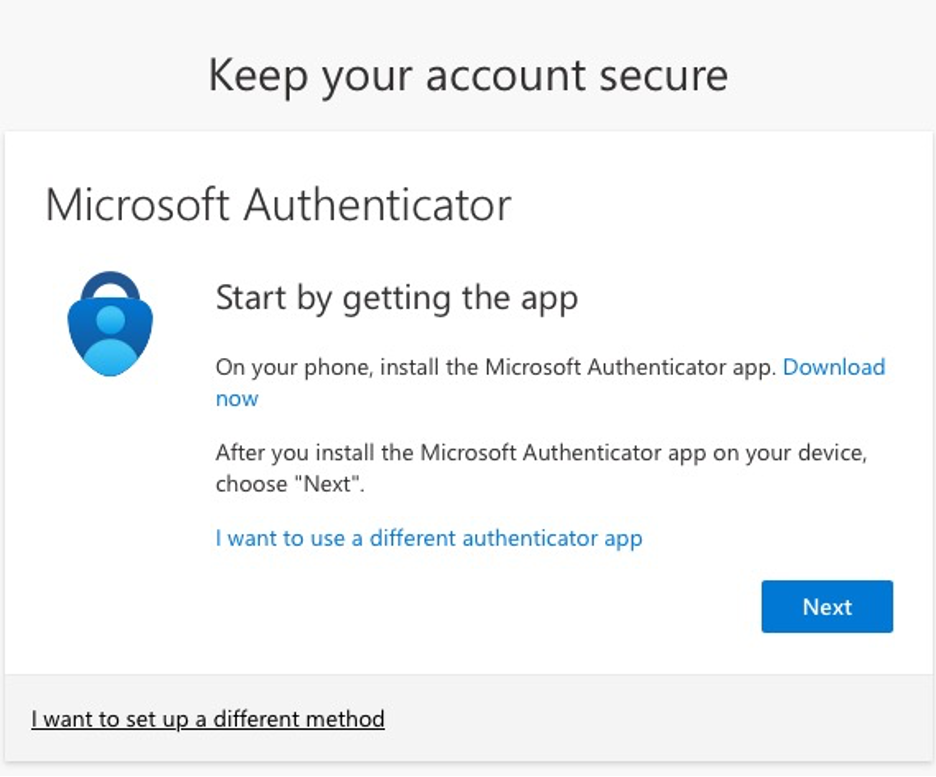
  1. If MFA has been enabled by your organisation, after entering your passwordย youโ€™llย see a promptย sayingย โ€œMore information requiredโ€ย orย โ€œKeep your account secure / Your organisation requires you to set up โ€ฆโ€
  2. Click Next to continue.

Step 2: Choose your authentication method

  1. The default recommended method is using the Microsoft Authenticator app on your smartphone.
  2. If you donโ€™t want to use the app (or canโ€™t), you may click โ€œI want to set up a different methodโ€ (for example: text message or phone call).
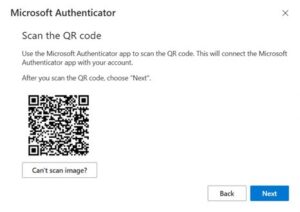
  3. If using the Authenticator app: On your mobile device, install /open the app, then on the computer click Next. The screen should display a QR code for you to scan.

Step 3: Install / Open the Microsoft Authenticator app

  1. On your phone (iOS or Android) go to the App Store / Google Play and download Microsoft Authenticator.
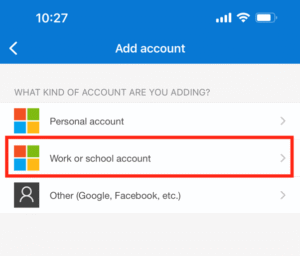
  2. Open the app and choose to Add account โ†’ Work or school account (or โ€œOtherโ€ if instructed).
  3. Use the appโ€™s camera-scan feature to scan the QR code displayed on your computer screen.

Step 4: Approve the sign-in / Number-matching

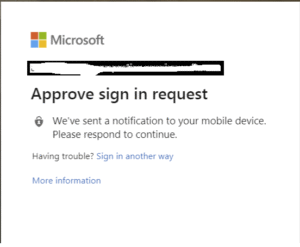
  1. Once the account is added to the Authenticator app, youโ€™ll typically receive a notification or be asked to enter a number code that appears on your computer screen into the app.
  2. On your computer click Next once youโ€™ve responded on your phone.
  3. Youโ€™ll see a confirmation that setup was successful.

Step 5: Add a backup method

  1. Once MFA is configured via the app, itโ€™s good practice to add a second method (for example: phone call, SMS, alternate device) in case you lose access to your primary device.
  2. Follow prompts to add, verify, and save your backup method.

Tips & User-Friendly Notes

  • The Authenticator app is faster and more secure than SMS or phone call methods.
  • Keep your phone with you or ensure your backup method is valid – losing both may lock you out.
  • If you change your phone or uninstall the app, donโ€™t delete your account from the app until youโ€™ve configured a new method.
  • Make sure your phone is connected to the Internet (WiFi or mobile data) when doing the setup.
  • After setup, you will not be prompted for MFA every time – typically only when on a new device, new browser, or the system deems it necessary.

Still need help?

Contact Nxt Gen IT support on 0333 231 1000

Every business has lived this moment… You send an important update to customers or prospects and the replies just stop.

No bouncebacks. No errors. Just silence.

Nine times out of ten, the problem isnโ€™t your message. Itโ€™s providers like Google tightening email standards again. And this latest update is the biggest shift Iโ€™ve seen since Gmail split inbox tabs.

As someone who spends a lot of time helping SMEs steady their IT foundations, I can say this confidently: email deliverability is now an IT issue, not a marketing one. And ignoring it will hit sales, customer communication, and even staff productivity.

According to Nxt Gen ITโ€™s email deliverability expert, Ben Fielding, these new rules essentially mean one thing:
Businesses must behave like responsible publishers, or risk being blocked.

Let’s see whatโ€™s changed and what it means for you.


The essentials (in plain English)

Google now expects all businesses (even small senders) to meet strict technical and behavioural standards. Yahoo have already signalled alignment, and Microsoft and Apple are expected to follow.

If youโ€™ve ever hit Googleโ€™s criteria for a โ€œbulk senderโ€ (5,000+ emails/day to Gmail), enforcement is immediate and permanent. But even if youโ€™re nowhere near that volume, poor behaviour triggers the same blocks.

Hereโ€™s whatโ€™s new.

1. Email authentication is now mandatory

To reach Gmail inboxes, your domain must have:

  • SPF that passes
  • DKIM that passes
  • DMARC with a minimum policy of p=none

Miss any of these, and Google starts rejecting your traffic with codes like 5.7.27 or 5.7.30.

Why it matters:
Gmail is done โ€œtrustingโ€ good intent. If your domain isnโ€™t technically verified, Google treats it like a spoof.

I often see SMEs with half-configured records or outdated DNS settings and this update exposes that instantly.

2. Your โ€œFrom:โ€ address must match your authenticated domain

If you send from hello@yourcompany.co.uk but your system actually sends mail from another domain in the background, Google will now block it (error 4.7.32).

This is common with older CRMs, legacy ticketing systems, and bulk email tools that rewrite the From: address โ€œfor convenienceโ€.

3. TLS encryption is required

Emails sent without encryption will now fail with error 5.7.29.

Think of TLS as the equivalent of HTTPS for email. If youโ€™re using older servers, outdated SMTP relays, or cost-cutting email gateways, this will matter.

4. Your spam complaint rate must stay under 0.3%

This is the behavioural one and itโ€™s the rule I believe will sting the most.

Google is clear:

  • 0.1% starts causing inboxing problems
  • 0.3%+ means hard blocks for at least seven days

Translation:
If just 3 out of every 1,000 people hit โ€œmark as spamโ€, your domain becomes a liability.

In my experience, high spam rates nearly always trace back to three issues:

  • sending to cold or unengaged lists
  • overusing bulk tools
  • mixing operational emails with newsletters or promotions

5. One-click unsubscribe is now mandatory

For any promotional email, not just marketing newsletters.

Transactional messages (password resets, invoices, support tickets) are exempt.Everything else must include a true one-click unsubscribe using official List-Unsubscribe headers.

Footer links arenโ€™t enough.
โ€œEmail us to unsubscribeโ€ isnโ€™t enough.
Landing pages arenโ€™t enough.

This rule exists to protect inboxes and to protect your reputation.

6. PTR (reverse DNS) must match your sending IP

If your email provider doesnโ€™t have proper reverse DNS configured, Google will block your traffic (5.7.25).

This mainly affects businesses using:

  • cheap bulk mail tools
  • outdated shared hosting
  • legacy on-prem email servers

Itโ€™s one of the easiest issues to miss, and one of the quickest to fix with proper IT support.

7. New domains will be heavily scrutinised

Any domain that hasnโ€™t sent 5,000+ messages/day to Gmail since Jan 2024 is considered โ€œnewโ€. These domains get no grace period. Enforcement is harsher and faster.

This is Googleโ€™s official crackdown on burner or temporary domains.


What this really means for SMEs

Underneath the technical rules, Google is sending one message:

Email is no longer a free-for-all. Every sender must prove theyโ€™re legitimate.

Google, Microsoft, Yahoo, and Apple are shifting towards one global standard and by 202, we expect every major mailbox provider will enforce the same baseline.

From what I see across UK SMEs, the businesses most at risk are those using:

  • outdated CRMs
  • older on-prem mail servers
  • newsletter platforms with weak compliance
  • โ€œquick winโ€ mailing tools
  • shared IPs
  • unsegmented bulk lists

This isnโ€™t about marketing. Itโ€™s about trust and whether inboxes believe youโ€™re a safe sender.


What you should do next (the practical list)

If I were reviewing your organisation tomorrow, hereโ€™s where Iโ€™d start.

1. Check your SPF, DKIM, and DMARC

Make sure all three exist, pass, and are aligned.

2. Align your From: domain

Stop using vanity or look-alike domains your infrastructure canโ€™t authenticate.

3. Implement one-click unsubscribe

If you send any promotional content, you must support RFC 8058.

4. Clean your mailing lists

Remove:

  • dead addresses
  • disengaged recipients
  • anyone who hasnโ€™t opened an email in 90 days

5. Separate your email traffic

Operational, marketing, and automated notifications should not share the same infrastructure.

6. Monitor your spam rate daily

Use Gmail Postmaster Tools.
If youโ€™re over 0.3%, stop sending until fixed.

7. Review every link for redirect chains

More than one redirect (common with tracking-heavy CRMs) fuels spam signals.


Nxt Steps

If youโ€™re unsure where your business stands, donโ€™t guess. These changes are technical, behavioural, and far-reaching, and for most SMEs, they land across IT, marketing, and operations at the same time.

At Nxt Gen IT, we help companies build people-first technology foundations that make communication reliable, secure, and compliant. If youโ€™d like a clear picture of your organisationโ€™s email health authentication, alignment, infrastructure, and deliverability. Iโ€™m always happy to talk.

Book a meeting with Ben Fielding today and explore how Nxt Gen IT can help you build IT peace of mind and email reliability that just works.

Ever feel like your day disappears into endless clicks, tabs, and windows?

Here is something simple that can make a big difference to your productivity: Windows keyboard shortcuts.

Yes, you probably already know Ctrl + C and Ctrl + V for copy and paste. But Windows is full of hidden shortcuts that can save time, reduce frustration, and help you focus on what actually matters: getting work done.

I often see this in action with clients. Teams spend thousands on new software tools but overlook small workflow habits that could save hours each week. Keyboard shortcuts are a perfect example of that.


Why Shortcuts Matter for Businesses

Efficiency does not always come from big investments. Sometimes, it is about getting more from the technology you already have.

Here is why I encourage every SME to create their own shortcut cheat sheet:

  • Faster navigation means less wasted time hunting through menus.
  • Reduced strain from constant mouse movements and clicks.
  • Improved consistency across teams when everyone uses the same methods.
  • Less distraction, since hands stay on the keyboard.

If each employee saves even five minutes a day, across a 20-person team that adds up to over 40 hours a month! That is an entire working week regained.


Clipboard Superpower: Windows + V

One shortcut many people miss is Windows + V. It opens your Clipboard history, allowing you to pick from recently copied items and paste any one of them.

By default, Clipboard history is turned off. To enable it:

  1. Open Settings and go to System.
  2. Select Clipboard.
  3. Turn on Clipboard history.

You can also pin frequently used snippets and, if you sign in with a Microsoft or Entra ID account, sync your Clipboard across devices.

For IT administrators, this feature can be managed through Group Policy or Intune, which makes it easy to roll out across your business safely and consistently.

Once it is enabled, Windows + V becomes a real time saver. It lets you copy multiple things at once, move between documents faster, and eliminate that โ€œoops, I copied over itโ€ moment.


The Ultimate Windows Shortcut Cheat Sheet

Below is a table of useful Windows shortcuts that most people do not use but should. I’ve grouped them by purpose so they are easy to remember (but still might be worth bookmarking this page).

CategoryShortcutWhat It Does
Everyday EssentialsCtrl + C / Ctrl + V / Ctrl + XCopy, paste, or cut selected text or files
Ctrl + Z / Ctrl + YUndo or redo your last action
Ctrl + ASelect everything in a document or folder
Ctrl + SSave your current document
Alt + F4Close the current app or window
Desktop and Windows NavigationWindows + DShow or hide the desktop instantly
Windows + EOpen File Explorer
Windows + TabOpen Task View to see all open windows
Alt + TabSwitch quickly between open apps
Windows + Arrow KeysSnap windows to one side or corner of the screen
Screenshots and SnippingWindows + Shift + SOpen Snipping Tool to capture part of the screen
PrtScnCopy a screenshot of the full screen to the clipboard
Alt + PrtScnCapture only the active window
Super Clipboard!Windows + VOpen Clipboard history and paste from it
Windows + . (period)Open the emoji and symbols picker
Windows + HStart voice typing
System and SettingsWindows + LLock your PC instantly
Windows + IOpen Settings
Windows + AOpen the Quick Settings panel for Wi Fi, Bluetooth, and more
Windows + ROpen the Run command box
Ctrl + Shift + EscOpen Task Manager directly
Virtual Desktops and MultitaskingWindows + Ctrl + DCreate a new virtual desktop
Windows + Ctrl + Left or Right ArrowSwitch between virtual desktops
Windows + Ctrl + F4Close the current virtual desktop
Accessibility and ZoomWindows + Plus (plus)Zoom in with Magnifier
Windows + Minus (minus)Zoom out with Magnifier
Power UsersWindows + XOpen the Quick Link menu
Windows + PauseOpen System Information
Shift + DeletePermanently delete files without sending to Recycle Bin

Tip: Try learning three new shortcuts each week. Within a month, you will notice how much faster your workflow feels.


Making It a Team Habit

Shortcuts are most powerful when they become part of your daily culture. I often help clients build internal cheat sheets that include both Windows shortcuts and app-specific ones for tools like Microsoft 365, Teams, and Outlook.

Here is how to make it stick:

  1. Print and share your shortcut guide so it is visible at every desk.
  2. Add a few shortcuts to onboarding sessions for new team members.
  3. Encourage friendly competition, such as who can master the most shortcuts by the end of the month.
  4. Create role-specific lists. For example, finance teams might focus on Excel shortcuts, while customer service staff use Outlook and Teams shortcuts.

The Bigger Picture: Smarter Use of Technology

Boosting productivity is not always about buying new software or hardware. It is about making sure your people know how to use technology intelligently.

At Nxt Gen IT, I often see that the businesses with the most efficient teams are not necessarily the ones with the most advanced systems. They are the ones who take the time to understand their tools and use every feature available.

Shortcuts may seem small, but they are part of a bigger picture of people-first technology that helps staff feel confident and capable.


Your Own Shortcut to IT Peace of Mind

If you would like to go further, Nxt Gen IT can help your business get the best from Microsoft 365, Teams, and Windows. From productivity training to managed IT support, we make technology simpler and more secure for UK SMEs.


Nxt Steps

Would you like a customised Windows and Microsoft 365 shortcut guide tailored for your team?

Book a quick chat with Nxt Gen IT. We will help you identify simple, practical ways to save time, improve focus, and make your existing tools work harder for you.