

As Microsoft Teams continues to solidify its place as an essential communication tool, more businesses are exploring ways to enhance productivity with its newest add-ons: Microsoft Teams Premium and Copilot for Microsoft 365. With nearly two-thirds of businesses using Teams, understanding how these options differ and which features they bring can help organisations determine the best fit for their unique needs. Copilot vs Teams Premium? Let’s see if there’s a winner
Understanding Microsoft Teams Premium
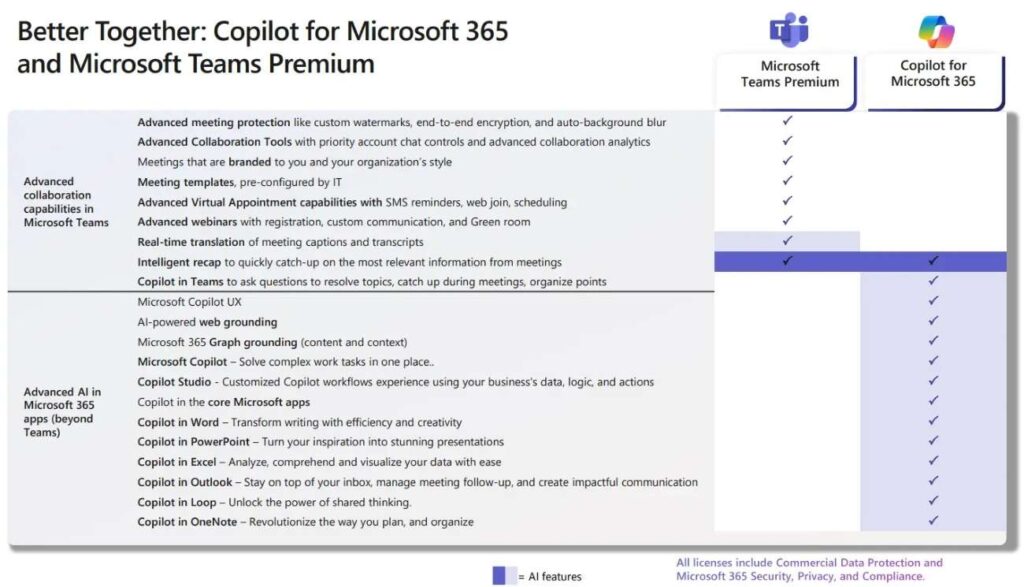
Launched in early 2023, Microsoft Teams Premium is an add-on designed to extend the core functionality of Microsoft Teams. It provides an extensive suite of features for branding, enhanced meeting experiences, and large-scale event management. This is particularly valuable for companies hosting webinars or large meetings where control, customisation, and management features are paramount. Here’s a breakdown of what Teams Premium offers:
- Custom Branding for Meetings
Create a branded experience within meetings, enhancing professional image and customisation. - Advanced Host Controls and Content Sharing
Get additional management options, such as controlling who can share content, making large meetings easier to manage. - In-Meeting Closed Captioning with Translation
Improve accessibility with automatic translation and closed captioning for real-time support. - Webinar and Audience Management Features: Tools like reporting and attendee management help streamline webinar events and large meetings.
- Bandwidth Optimisation with Content Delivery
This feature supports enterprise content delivery, which is ideal for town halls and all-hands meetings, providing smooth experiences with minimal disruption. - AI-Powered Meeting Insights: Access OpenAI’s GPT-3.5 model to enable intelligent meeting summaries, AI-generated action items, and real-time translation of transcripts.
Microsoft Teams Premium costs around £8 per user per month as an add-on. A very accessible option for businesses needing enhanced meeting and event capabilities.
What does Copilot add to Microsoft Teams?
Copilot, a generative AI tool within Microsoft Teams, is part of the larger Copilot for Microsoft 365 license. This tool leverages AI to assist with personal productivity, helping individuals maximise their time during meetings and streamline communication. Copilot uses data from Microsoft Graph and Microsoft 365 to enhance productivity by automating tasks, summarising content, and creating actionable items. Here’s what Copilot brings to the table:
- Automatic Meeting Summaries
Provides quick summaries of key meeting points and discussions for easy reference. - Interactive Chatbot for Attendees
Attendees can catch up on missed details or ask questions via a chatbot feature, saving time during meetings. - Meeting Agenda Creation
Generates agendas from chats, keeping meetings structured and on-point. - Capture and Assign Action Items
Instantly capture decisions and action points, ensuring responsibilities are clear. - Channel and Chat Summarisation
Helps users navigate Teams channels by summarising previous discussions, allowing for more efficient collaboration. - Cross-Platform Capabilities
Copilot spans the entire Microsoft 365 suite, with additional features like creating PowerPoint slides from Excel data, suggesting email responses in Outlook, and summarising content across applications.
The cost for the Copilot for Microsoft 365 license, which includes Copilot for Teams, is approximately £23 per user per month (edit: Microsoft have now launched Copilot Business at around £16 pupm)
Comparing Microsoft Teams Premium and Copilot
While both Teams Premium and Copilot bring valuable features, their primary functions and target users differ. Here’s a comparison to help clarify which might be best for different business needs:
- Personal Productivity (Copilot)
Ideal for individuals or teams focused on task automation, summarising discussions, and managing communications across the Microsoft 365 suite. - Event Management and Branding (Teams Premium)
Perfect for companies that conduct large-scale webinars, host external meetings, or need branded, controlled meeting environments.
For example, marketing teams or training departments in businesses that frequently run webinars might find Teams Premium’s customisation tools essential. Conversely, a project management team coordinating ongoing tasks across multiple channels might find Copilot’s summarisation and task automation features invaluable.
Making the Choice: Copilot vs Teams Premium? Or Both?
Businesses don’t need to choose between Teams Premium and Copilot exclusively. In fact, many organisations may find that adopting both provides a comprehensive solution. Teams Premium for structured, branded event management, and Copilot for day-to-day task automation and productivity support.
Consider these tips to make the best choice for your team:
- Identify Core Needs
Determine whether the primary need is for large-scale event management and branding or if individual productivity tools will drive better outcomes. - Evaluate Costs vs. Benefits
Both solutions add monthly costs. However, for tasks requiring streamlined organisation or large-scale meetings, the ROI on these tools can be high. - Test Before Committing
Consider running pilot programs with small groups within the organisation to test features and measure impact before a wider rollout. - Hybrid Use Cases
For those needing both individual and organisational support, integrating both solutions can provide benefits across all levels, from everyday collaboration to high-stakes presentations and events.
Nxt Steps
Choosing the right Teams add-on can transform how your business manages communication, collaboration, and events. If you’re looking to determine which solution aligns best with your unique needs, Nxt Gen IT can guide you through setup, support, and seamless integration.
We hope we’ve settled the Copilot vs Teams Premium debate for you but if want to explore further, contact Nxt Gen IT for expert advice on Teams solutions.

Ben helps growing businesses turn technology into a driver of performance instead of a barrier. At Nxt Gen IT he works with SME leaders, recruiters, and fast-scaling teams to design solutions that improve reliability, strengthen security, and unlock growth.
With a background in email deliverability and cloud systems, Ben specialises in making sure businesses communicate effectively, keep data safe, and get the most from Microsoft 365. His experience spans solution design, managed IT services, and virtual CIO support, always with a focus on practical outcomes that reduce headaches for business owners.
Ben has supported organisations across the UK, from recruitment agencies struggling with inbox placement to SaaS firms scaling fast, and SMEs needing a trusted partner for their IT. He believes tech is never the end goal: growth is. His role is to make sure technology never gets in the way of it.